<?xml version="1.0" encoding="utf-8"?><feed xmlns="http://www.w3.org/2005/Atom" ><generator uri="https://jekyllrb.com/" version="3.10.0">Jekyll</generator><link href="https://jfumero.dev/feed.xml" rel="self" type="application/atom+xml" /><link href="https://jfumero.dev/" rel="alternate" type="text/html" /><updated>2026-04-27T07:22:24+01:00</updated><id>https://jfumero.dev/feed.xml</id><title type="html">Juan Fumero</title><subtitle>personal description</subtitle><author><name>Juan Fumero, PhD</name><email>juan@jfumero.dev</email></author><entry><title type="html">Docker Compose for SonarQube: A Simple YAML Template</title><link href="https://jfumero.dev/posts/2026/02/14/sonar-docker-compose" rel="alternate" type="text/html" title="Docker Compose for SonarQube: A Simple YAML Template" /><published>2026-02-14T00:00:00+00:00</published><updated>2026-02-14T00:00:00+00:00</updated><id>https://jfumero.dev/posts/2026/02/14/sonar-docker-compose</id><content type="html" xml:base="https://jfumero.dev/posts/2026/02/14/sonar-docker-compose"><![CDATA[<h2 id="docker-compose-for-sonarqube-community">Docker Compose for SonarQube Community</h2>

<div class="language-yml highlighter-rouge"><div class="highlight"><pre class="highlight"><code><span class="na">services</span><span class="pi">:</span>
  <span class="na">sonarqube</span><span class="pi">:</span>
    <span class="na">image</span><span class="pi">:</span> <span class="s">sonarqube:community</span>
    <span class="na">restart</span><span class="pi">:</span> <span class="s">unless-stopped</span>
    <span class="na">depends_on</span><span class="pi">:</span>
      <span class="pi">-</span> <span class="s">db</span>
    <span class="na">environment</span><span class="pi">:</span>
      <span class="pi">-</span> <span class="s">SONAR_JDBC_URL=jdbc:postgresql://db:5432/sonar</span>
      <span class="pi">-</span> <span class="s">SONAR_JDBC_USERNAME=sonar</span>
      <span class="pi">-</span> <span class="s">SONAR_JDBC_PASSWORD=sonar</span>
    <span class="na">volumes</span><span class="pi">:</span>
      <span class="pi">-</span> <span class="s">sonarqube_data:/opt/sonarqube/data</span>
      <span class="pi">-</span> <span class="s">sonarqube_extensions:/opt/sonarqube/extensions</span>
      <span class="pi">-</span> <span class="s">sonarqube_logs:/opt/sonarqube/logs</span>
    <span class="na">ports</span><span class="pi">:</span>
      <span class="pi">-</span> <span class="s2">"</span><span class="s">9000:9000"</span>
    <span class="na">networks</span><span class="pi">:</span>
      <span class="pi">-</span> <span class="s">sonarnet</span>

  <span class="na">db</span><span class="pi">:</span>
    <span class="na">image</span><span class="pi">:</span> <span class="s">postgres:15</span>
    <span class="na">restart</span><span class="pi">:</span> <span class="s">unless-stopped</span>
    <span class="na">environment</span><span class="pi">:</span>
      <span class="pi">-</span> <span class="s">POSTGRES_USER=sonar</span>
      <span class="pi">-</span> <span class="s">POSTGRES_PASSWORD=sonar</span>
      <span class="pi">-</span> <span class="s">POSTGRES_DB=sonar</span>
    <span class="na">volumes</span><span class="pi">:</span>
      <span class="pi">-</span> <span class="s">postgresql_data:/var/lib/postgresql/data</span>
    <span class="na">networks</span><span class="pi">:</span>
      <span class="pi">-</span> <span class="s">sonarnet</span>

<span class="na">networks</span><span class="pi">:</span>
  <span class="na">sonarnet</span><span class="pi">:</span>

<span class="na">volumes</span><span class="pi">:</span>
  <span class="na">sonarqube_data</span><span class="pi">:</span>
  <span class="na">sonarqube_extensions</span><span class="pi">:</span>
  <span class="na">sonarqube_logs</span><span class="pi">:</span>
  <span class="na">postgresql_data</span><span class="pi">:</span>
</code></pre></div></div>

<p>Then, we pull the images:</p>

<div class="language-bash highlighter-rouge"><div class="highlight"><pre class="highlight"><code>docker compose pull
</code></pre></div></div>

<p>And run the server:</p>

<div class="language-bash highlighter-rouge"><div class="highlight"><pre class="highlight"><code>docker compose up <span class="nt">-d</span>
</code></pre></div></div>

<p>To setup Sonar, we access to <code class="language-plaintext highlighter-rouge">&lt;ip&gt;:9000</code> and update the password. 
The default is:</p>
<ul>
  <li>User: <code class="language-plaintext highlighter-rouge">admin</code></li>
  <li>Password: <code class="language-plaintext highlighter-rouge">admin</code></li>
</ul>

<h2 id="update-the-docker-image-for-sonar">Update the docker image for Sonar</h2>

<div class="language-bash highlighter-rouge"><div class="highlight"><pre class="highlight"><code>docker compose down
docker compose pull 
docker compose up <span class="nt">-d</span>   
</code></pre></div></div>

<h2 id="links">Links:</h2>

<ul>
  <li><a href="https://docs.sonarsource.com/sonarqube-server/server-installation/from-docker-image/set-up-and-start-container">https://docs.sonarsource.com/sonarqube-server/server-installation/from-docker-image/set-up-and-start-container</a></li>
</ul>]]></content><author><name>Juan Fumero, PhD</name><email>juan@jfumero.dev</email></author><category term="Docker" /><category term="SonarQube" /><summary type="html"><![CDATA[Basic yaml file for Docker Compose to run SonarQube.]]></summary></entry><entry><title type="html">Building The Regression Test Harness for the OpenJDK (jtreg) from Source</title><link href="https://jfumero.dev/posts/2026/02/05/jdk-jtreg-build" rel="alternate" type="text/html" title="Building The Regression Test Harness for the OpenJDK (jtreg) from Source" /><published>2026-02-05T00:00:00+00:00</published><updated>2026-02-05T00:00:00+00:00</updated><id>https://jfumero.dev/posts/2026/02/05/jtreg-build</id><content type="html" xml:base="https://jfumero.dev/posts/2026/02/05/jdk-jtreg-build"><![CDATA[<h2 id="build-jtreg">Build JTREG</h2>

<p>As in February 2026, to build <code class="language-plaintext highlighter-rouge">jtreg</code> from source, we need to use JDK 25.</p>

<div class="language-bash highlighter-rouge"><div class="highlight"><pre class="highlight"><code>git clone https://github.com/openjdk/jtreg/
<span class="nb">cd </span>jtreg


<span class="c">## Use JDK 25 (e.g., Oracle JDK). We can use sdkman to </span>
<span class="c">## obtain the desired JDK version</span>
sdk use java 25.0.1-oracle

<span class="c">## Build jtreg</span>
sh ./make/build.sh

<span class="c">## Check</span>
<span class="nv">$ </span>./build/images/jtreg/bin/jtreg <span class="nt">-version</span> 

jtreg 8.3-dev+0
Installed <span class="k">in</span> /home/juan/bin/jtreg/build/images/jtreg/lib/jtreg.jar
Running on platform version 25.0.1 from /home/juan/.sdkman/candidates/java/25.0.1-oracle.
Built with Java<span class="o">(</span>TM<span class="o">)</span> 2 SDK, Version 25.0.1+8-LTS-27 on February 04, 2026.
JT Harness, version 6.0 ea b24 <span class="o">(</span>January 21, 2026<span class="o">)</span>
Java Assembler Tools, version 9.1 ea 01 <span class="o">(</span>January 21, 2026<span class="o">)</span>
TestNG: testng-7.3.0.jar, guice-5.1.0.jar, jcommander-1.82.jar
JUnit: junit-platform-console-standalone-1.14.2.jar
</code></pre></div></div>

<p>To make <code class="language-plaintext highlighter-rouge">jtreg</code> easily accessible, it is convenient to declare the <code class="language-plaintext highlighter-rouge">JTREG_HOME</code> and update your <code class="language-plaintext highlighter-rouge">PATH</code> variable.</p>

<div class="language-bash highlighter-rouge"><div class="highlight"><pre class="highlight"><code><span class="c">#JTREG_HOME</span>
<span class="nb">export </span><span class="nv">JTREG_HOME</span><span class="o">=</span>&lt;path-to&gt;/jtreg/build/images/jtreg
<span class="nb">export </span><span class="nv">PATH</span><span class="o">=</span>&lt;path-to&gt;/jtreg/build/images/jtreg/bin:<span class="nv">$PATH</span>
</code></pre></div></div>

<h2 id="build-idea-plugin-for-jtreg">Build IDEA Plugin for JTREG</h2>

<p>The <code class="language-plaintext highlighter-rouge">jtreg</code> repository also contains source code for an IntelliJ IDEA plugin.</p>

<div class="language-bash highlighter-rouge"><div class="highlight"><pre class="highlight"><code><span class="nb">cd</span> ./plugins/idea
</code></pre></div></div>

<p>Update the file <code class="language-plaintext highlighter-rouge">gradle.properties</code> with the <code class="language-plaintext highlighter-rouge">jtregHome</code> path pointing to the <code class="language-plaintext highlighter-rouge">JTREG_HOME</code> we just built.</p>

<div class="language-gradle highlighter-rouge"><div class="highlight"><pre class="highlight"><code><span class="n">jtregHome</span> <span class="o">=</span> <span class="o">..</span><span class="s">/../</span><span class="n">build</span><span class="s">/images/</span><span class="n">jtreg</span>
</code></pre></div></div>

<p>To build the plugin, we need JDK 21.</p>

<div class="language-bash highlighter-rouge"><div class="highlight"><pre class="highlight"><code>sdk use java 21.0.9-oracle

sh gradlew clean build
</code></pre></div></div>

<p>The plugin is located at <code class="language-plaintext highlighter-rouge">plugins/idea/build/distributions/jtreg-plugin-1.19.zip</code>.</p>

<p>To install it in IntelliJ IDEA:</p>

<ol>
  <li>Go to Settings &gt; Plugins.</li>
  <li>Click the Gear Icon ⚙️ and select “Install Plugin from Disk…”.</li>
  <li>Select the generated .zip file.</li>
  <li>Restart your IDE.</li>
</ol>]]></content><author><name>Juan Fumero, PhD</name><email>juan@jfumero.dev</email></author><category term="JDK" /><category term="jtreg" /><category term="testing" /><category term="Build" /><summary type="html"><![CDATA[Build JTREG]]></summary></entry><entry><title type="html">How to Install NVIDIA Drivers and CUDA Toolkit on Oracle Linux 10</title><link href="https://jfumero.dev/posts/2025/08/15/nvidia-drivers-and-toolkit-oracle-linux10" rel="alternate" type="text/html" title="How to Install NVIDIA Drivers and CUDA Toolkit on Oracle Linux 10" /><published>2025-08-15T00:00:00+01:00</published><updated>2025-08-15T00:00:00+01:00</updated><id>https://jfumero.dev/posts/2025/08/15/nvidia-drivers-oracle-linux10</id><content type="html" xml:base="https://jfumero.dev/posts/2025/08/15/nvidia-drivers-and-toolkit-oracle-linux10"><![CDATA[<p>For any developer or power user who’s ever tried to install NVIDIA drivers on Linux, the process can feel less like a straightforward task. While most mainstream distributions have streamlined the process, trying to get NVIDIA drivers working on Oracle Linux for a desktop setup is a unique challenge. The available documentation is often sparse, focusing on server-side GPU acceleration rather than desktop graphics, leaving a trail of broken dependencies and black screens in its wake (<em>and that just happened to me while I was trying to install the drivers as well</em> 😢).</p>

<p>This guide aims to fill that gap. We’ll walk through the process step-by-step, demystifying the installation of NVIDIA drivers on the latest Oracle Linux 10 for desktop setups. Note, for data centers, <a href="https://docs.nvidia.com/datacenter/tesla/driver-installation-guide/">NVIDIA guidelines</a> covers how to install and configure the NVIDIA driver for servers.</p>

<p>In addition, this post also shows how to configure CUDA 13.0 SDK to compile and run our CUDA programs on NVIDIA GPUs.</p>

<h3 id="1-update-the-system">1. Update the system</h3>

<p>First of all, we need to update the system. This installation guideline assumes a fresh installation of the Oracle Linux 10 with Gnome 47.4.</p>

<div class="language-bash highlighter-rouge"><div class="highlight"><pre class="highlight"><code><span class="nb">sudo </span>dnf update
reboot
</code></pre></div></div>

<p>At the time of writing this post, this the the latest Linux Kernel available for Oracle Linux 10:</p>

<div class="language-bash highlighter-rouge"><div class="highlight"><pre class="highlight"><code><span class="nv">$ </span><span class="nb">uname</span> <span class="nt">-a</span>
Linux oraclelinux 6.12.0-101.33.4.3.el10uek.x86_64 <span class="c">#1 SMP PREEMPT_DYNAMIC Mon Jul 14 18:29:21 PDT 2025 x86_64 GNU/Linux</span>
</code></pre></div></div>

<p>So, keep in mind we are using a <a href="https://docs.oracle.com/en/operating-systems/uek/">UEK</a> (Unbreakable Enterprise Kernel) Linux kernel. 
This is a Linux Kernel developed by Oracle for the Oracle Linux distribution that is optimized for the Oracle Cloud. <strong>Thus, when we install the kernel pre-requisites for the NVIDIA drivers, we need 
to install also the UEK versions.</strong></p>

<h3 id="2-download-the-latest-nvidia-driver">2. Download the latest NVIDIA Driver</h3>

<p>Visit the <a href="https://www.nvidia.com/en-us/drivers/">NVIDIA website</a> to download the latest NVIDIA driver. 
At the time of writing this post, the latest version is <code class="language-plaintext highlighter-rouge">580.76.05</code>.</p>

<p>Download the file and give execution permisions:</p>

<div class="language-bash highlighter-rouge"><div class="highlight"><pre class="highlight"><code><span class="nb">chmod</span> +x NVIDIA-Linux-x86_64-580.76.05.run
</code></pre></div></div>

<h3 id="3-installing-the-dependencies">3. Installing the dependencies</h3>

<p>Enable epel Oracle Epel Repo:</p>

<div class="language-bash highlighter-rouge"><div class="highlight"><pre class="highlight"><code><span class="nb">sudo </span>dnf <span class="nb">install </span>oracle-epel-release-el10-1.0-2.el10.x86_64
</code></pre></div></div>

<p>Install the dependencies:</p>

<div class="language-bash highlighter-rouge"><div class="highlight"><pre class="highlight"><code><span class="nb">sudo </span>dnf <span class="nb">install </span>kernel-uek-devel gcc make acpid libglvnd-glx libglvnd-opengl libglvnd-devel pkgconfig xorg-x11-server-Xwayland libxcb egl-wayland
</code></pre></div></div>

<h3 id="4-disable-nouveau-and-nova-core">4. Disable Nouveau and NOVA Core</h3>

<p>Access as root:</p>

<div class="language-bash highlighter-rouge"><div class="highlight"><pre class="highlight"><code><span class="nb">sudo </span>su -
</code></pre></div></div>

<p>Then disable the <code class="language-plaintext highlighter-rouge">nouveau</code> and <code class="language-plaintext highlighter-rouge">nova_core</code> drivers:</p>

<div class="language-bash highlighter-rouge"><div class="highlight"><pre class="highlight"><code><span class="nb">echo</span> <span class="s2">"blacklist nouveau"</span> <span class="o">&gt;&gt;</span> /etc/modprobe.d/blacklist.conf
<span class="nb">echo</span> <span class="s2">"blacklist nova_core"</span> <span class="o">&gt;&gt;</span> /etc/modprobe.d/blacklist.conf
<span class="nb">echo</span> <span class="s2">"options nvidia NVreg_PreserveVideoMemoryAllocations=1"</span> <span class="o">&gt;&gt;</span> /etc/modprobe.d/nvidia.conf
<span class="nb">echo</span> <span class="s2">"options nvidia-drm modeset=1 fbdev=0"</span> <span class="o">&gt;&gt;</span> /etc/modprobe.d/nvidia.conf
</code></pre></div></div>

<h3 id="5-update-the-grub2-configuration">5. Update the grub2 configuration</h3>

<p>As described in the excellent <a href="https://www.if-not-true-then-false.com/2015/fedora-nvidia-guide/">if-not-true-then-false</a> blog, we then need to update the <code class="language-plaintext highlighter-rouge">grub2</code> con configuration and create a new image.</p>

<div class="language-bash highlighter-rouge"><div class="highlight"><pre class="highlight"><code>grub2-mkconfig <span class="nt">-o</span> /boot/grub2/grub.cfg
grub2-mkconfig <span class="nt">-o</span> /boot/efi/EFI/redhat/grub.cfg
</code></pre></div></div>

<div class="language-bash highlighter-rouge"><div class="highlight"><pre class="highlight"><code><span class="nb">mv</span> /boot/initramfs-<span class="si">$(</span><span class="nb">uname</span> <span class="nt">-r</span><span class="si">)</span>.img /boot/initramfs-<span class="si">$(</span><span class="nb">uname</span> <span class="nt">-r</span><span class="si">)</span><span class="nt">-nouveau-nova</span>.img
dracut /boot/initramfs-<span class="si">$(</span><span class="nb">uname</span> <span class="nt">-r</span><span class="si">)</span>.img <span class="si">$(</span><span class="nb">uname</span> <span class="nt">-r</span><span class="si">)</span>
</code></pre></div></div>

<h3 id="6-install-the-nvidia-driver">6. Install the NVIDIA Driver</h3>

<p>Disable the graphical interface to install the NVIDIA Driver. 
We will enable it again once the installation is done.</p>

<div class="language-bash highlighter-rouge"><div class="highlight"><pre class="highlight"><code>systemctl set-default multi-user.target
</code></pre></div></div>

<p>Then we can reboot:</p>

<div class="language-bash highlighter-rouge"><div class="highlight"><pre class="highlight"><code>reboot
</code></pre></div></div>

<p>To install the NVIDIA driver, just run the following script, and follow the instructions:</p>

<div class="language-bash highlighter-rouge"><div class="highlight"><pre class="highlight"><code><span class="nb">sudo</span> ./NVIDIA-Linux-x86_64-580.76.05.run
</code></pre></div></div>

<p>Once the installation is done, enable enable the graphics interface:</p>

<div class="language-bash highlighter-rouge"><div class="highlight"><pre class="highlight"><code>systemctl set-default graphical.target
reboot
</code></pre></div></div>

<p>Check with the <code class="language-plaintext highlighter-rouge">nvidia-smi</code> command:</p>

<div class="language-bash highlighter-rouge"><div class="highlight"><pre class="highlight"><code>Fri Aug 15 08:52:12 2025
+-----------------------------------------------------------------------------------------+
| NVIDIA-SMI 580.76.05              Driver Version: 580.76.05      CUDA Version: 13.0     |
+-----------------------------------------+------------------------+----------------------+
| GPU  Name                 Persistence-M | Bus-Id          Disp.A | Volatile Uncorr. ECC |
| Fan  Temp   Perf          Pwr:Usage/Cap |           Memory-Usage | GPU-Util  Compute M. |
|                                         |                        |               MIG M. |
|<span class="o">=========================================</span>+<span class="o">========================</span>+<span class="o">======================</span>|
|   0  NVIDIA GeForce RTX 2060 ...    Off |   00000000:01:00.0 Off |                  N/A |
| N/A   40C    P8              2W /   65W |       4MiB /   6144MiB |      0%      Default |
|                                         |                        |                  N/A |
+-----------------------------------------+------------------------+----------------------+

+-----------------------------------------------------------------------------------------+
| Processes:                                                                              |
|  GPU   GI   CI              PID   Type   Process name                        GPU Memory |
|        ID   ID                                                               Usage      |
|<span class="o">=========================================================================================</span>|
|    0   N/A  N/A            2744      G   /usr/bin/gnome-shell                      1MiB |
+-----------------------------------------------------------------------------------------+
</code></pre></div></div>

<p>Great, installation is done! Now, let’s compile and run some CUDA programs on the GPU.
To do that, we need to install the CUDA Toolkit.</p>

<h3 id="7-install-cuda-130-toolkit">7. Install CUDA 13.0 Toolkit</h3>

<div class="language-bash highlighter-rouge"><div class="highlight"><pre class="highlight"><code>wget https://developer.download.nvidia.com/compute/cuda/13.0.0/local_installers/cuda-repo-rhel9-13-0-local-13.0.0_580.65.06-1.x86_64.rpm
<span class="nb">sudo </span>rpm <span class="nt">-i</span> cuda-repo-rhel9-13-0-local-13.0.0_580.65.06-1.x86_64.rpm
<span class="nb">sudo </span>dnf clean all
<span class="nb">sudo </span>dnf <span class="nt">-y</span> <span class="nb">install </span>cuda-toolkit-13-0
</code></pre></div></div>

<p>Now we can run CUDA. Update the <code class="language-plaintext highlighter-rouge">PATH</code> and the <code class="language-plaintext highlighter-rouge">CPLUS_INCLUDE_PATH</code> to include the CUDA libraries and CUDA compiler. You can add the following lines in your <code class="language-plaintext highlighter-rouge">~/.bashrc</code>:</p>

<div class="language-bash highlighter-rouge"><div class="highlight"><pre class="highlight"><code><span class="nb">export </span><span class="nv">CPLUS_INCLUDE_PATH</span><span class="o">=</span>/usr/local/cuda/include
<span class="nb">export </span><span class="nv">LD_LIBRARY_PATH</span><span class="o">=</span>/usr/local/cuda/lib64
<span class="nb">export </span><span class="nv">PATH</span><span class="o">=</span>/usr/local/cuda/bin/:<span class="nv">$PATH</span>
</code></pre></div></div>

<p>And done!</p>

<p>Let’s try a few examples:</p>

<h3 id="8-download-cuda-sample-suite">8. Download CUDA Sample Suite</h3>

<div class="language-bash highlighter-rouge"><div class="highlight"><pre class="highlight"><code>git clone https://github.com/NVIDIA/cuda-samples
<span class="nb">cd </span>cuda-samples
<span class="nb">cd </span>Samples/0_Introduction/matrixMul/
<span class="nb">mkdir </span>build
<span class="nb">cd </span>build
cmake ..
make
</code></pre></div></div>

<p>Now we can run the example:</p>

<div class="language-bash highlighter-rouge"><div class="highlight"><pre class="highlight"><code>./matrixMul
<span class="o">[</span>Matrix Multiply Using CUDA] - Starting...
GPU Device 0: <span class="s2">"Turing"</span> with compute capability 7.5

MatrixA<span class="o">(</span>320,320<span class="o">)</span>, MatrixB<span class="o">(</span>640,320<span class="o">)</span>
Computing result using CUDA Kernel...
<span class="k">done
</span><span class="nv">Performance</span><span class="o">=</span> 382.48 GFlop/s, <span class="nv">Time</span><span class="o">=</span> 0.343 msec, <span class="nv">Size</span><span class="o">=</span> 131072000 Ops, <span class="nv">WorkgroupSize</span><span class="o">=</span> 1024 threads/block
Checking computed result <span class="k">for </span>correctness: Result <span class="o">=</span> PASS

NOTE: The CUDA Samples are not meant <span class="k">for </span>performance measurements. Results may vary when GPU Boost is enabled.
</code></pre></div></div>

<h3 id="references">References</h3>

<p>[1] <a href="https://www.if-not-true-then-false.com/2015/fedora-nvidia-guide/">https://www.if-not-true-then-false.com/2015/fedora-nvidia-guide/</a></p>

<p>[2] <a href="https://docs.nvidia.com/datacenter/tesla/driver-installation-guide/">https://docs.nvidia.com/datacenter/tesla/driver-installation-guide/</a></p>]]></content><author><name>Juan Fumero, PhD</name><email>juan@jfumero.dev</email></author><category term="CUDA Toolkit" /><category term="Drivers" /><category term="Installation" /><category term="Linux" /><category term="NVIDIA" /><category term="Oracle Linux 10" /><summary type="html"><![CDATA[How to install NVIDIA 580 Drivers and CUDA 13.0 Toolkit on Oracle Linux 10]]></summary></entry><entry><title type="html">How to enable NVIDIA Nsight Compute CLI in Fedora</title><link href="https://jfumero.dev/posts/2025/07/04/nvidia-ncu-enable-fedora" rel="alternate" type="text/html" title="How to enable NVIDIA Nsight Compute CLI in Fedora" /><published>2025-07-04T00:00:00+01:00</published><updated>2025-07-04T00:00:00+01:00</updated><id>https://jfumero.dev/posts/2025/07/04/nvidia-ncu-enable-fedora</id><content type="html" xml:base="https://jfumero.dev/posts/2025/07/04/nvidia-ncu-enable-fedora"><![CDATA[<p>When working with CUDA, <a href="https://docs.nvidia.com/nsight-compute/NsightComputeCli/index.html">NVIDIA’s Nsight Compute CLI</a> (<code class="language-plaintext highlighter-rouge">ncu</code>) is an indispensable command-line tool for profiling your CUDA applications. It lets you peek under the hood to see exactly how your code is performing on the GPU.</p>

<p>For instance, you can easily profile a CUDA application with a command like this:</p>

<div class="language-bash highlighter-rouge"><div class="highlight"><pre class="highlight"><code>ncu <span class="nt">-o</span> myProfileData <span class="nt">--set</span> full ./cuda_sample
</code></pre></div></div>

<p>The command above generates a file <code class="language-plaintext highlighter-rouge">myProfileData.ncu-rep</code> which we can inspect with NVIDIA Nsight GUI to see all the profiled data.</p>

<p>However, to set it up in Linux can be a bit tricky.</p>

<h2 id="setting-it-up-on-linux">Setting It Up on Linux</h2>

<p>The first time you use <code class="language-plaintext highlighter-rouge">ncu</code>, you might get the following error:</p>

<blockquote>
  <p>The user does not have permission to access NVIDIA GPU Performance Counters on the target device 0. For instructions on enabling permissions and to get more information see https://developer.nvidia.com/ERR_NVGPUCTRPERM</p>
</blockquote>

<p>Don’t worry, this is a common setup issue and it’s easy to fix! It means you need to grant users permission to access the GPU’s performance counters.</p>

<p>What you need to do is to add a new line in the <code class="language-plaintext highlighter-rouge">/etc/modprobe.d/nvidia.conf</code> with the following content:</p>

<div class="language-bash highlighter-rouge"><div class="highlight"><pre class="highlight"><code>options nvidia <span class="nv">NVreg_RestrictProfilingToAdminUsers</span><span class="o">=</span>0
</code></pre></div></div>

<p>Then, you need to reboot the machine. Now you should be able to run the <code class="language-plaintext highlighter-rouge">ncu</code> command and profiler our CUDA programs.</p>

<h2 id="a-note-for-fedora-and-similar-systems">A Note for Fedora and Similar Systems</h2>

<p>Following the <a href="https://developer.nvidia.com/nvidia-development-tools-solutions-err_nvgpuctrperm-permission-issue-performance-counters">NVIDIA guidelines</a>,
in some Linux distributions like Fedora, you might need to rebuild the <code class="language-plaintext highlighter-rouge">initrd</code>.
If the reboot alone doesn’t do the trick, you’ll need to rebuild it.</p>

<div class="language-bash highlighter-rouge"><div class="highlight"><pre class="highlight"><code>dracut <span class="nt">--regenerate-all</span> <span class="nt">-f</span>
</code></pre></div></div>

<h3 id="links">Links:</h3>

<ul>
  <li>
    <p><a href="https://developer.nvidia.com/nvidia-development-tools-solutions-err_nvgpuctrperm-permission-issue-performance-counters">developer.nvidia</a></p>
  </li>
  <li>
    <p><a href="https://hychiang.info/blog/2024/nsight-compute-permission-error/">https://hychiang.info/blog/2024/nsight-compute-permission-error</a></p>
  </li>
</ul>]]></content><author><name>Juan Fumero, PhD</name><email>juan@jfumero.dev</email></author><category term="Fedora" /><category term="NVIDIA Nsight Compute CLI" /><category term="Linux" /><summary type="html"><![CDATA[How to enable NVIDIA Nsight Compute CLI in Fedora]]></summary></entry><entry><title type="html">How to disable auto-update in Fedora</title><link href="https://jfumero.dev/posts/2025/06/25/fedora-disable-autoupdate" rel="alternate" type="text/html" title="How to disable auto-update in Fedora" /><published>2025-06-25T00:00:00+01:00</published><updated>2025-06-25T00:00:00+01:00</updated><id>https://jfumero.dev/posts/2025/06/25/fedora-disable-autoupdate</id><content type="html" xml:base="https://jfumero.dev/posts/2025/06/25/fedora-disable-autoupdate"><![CDATA[<p>To disable the automatic updates at restart run the following command:</p>

<div class="language-bash highlighter-rouge"><div class="highlight"><pre class="highlight"><code>gsettings <span class="nb">set </span>org.gnome.software download-updates <span class="nb">false</span>
</code></pre></div></div>

<p>You can still update manually using <code class="language-plaintext highlighter-rouge">dnf</code>. This previous command disables the option.
This is important, especially if you have enabled/configured custom kernels, or third party modules (e.g., NVIDIA Drivers).</p>

<h4 id="disable-kernel-updates">Disable Kernel Updates</h4>

<p>If you have installed a custom kernel or installed a third party kernel module, you can disable updates for the kernel.</p>

<p>To do so, edit the file <code class="language-plaintext highlighter-rouge">/etc/dnf/dnf.conf</code> within the <code class="language-plaintext highlighter-rouge">[main]</code> section, and add the following line:</p>

<div class="language-bash highlighter-rouge"><div class="highlight"><pre class="highlight"><code><span class="nv">exclude</span><span class="o">=</span>kernel<span class="k">*</span>
</code></pre></div></div>]]></content><author><name>Juan Fumero, PhD</name><email>juan@jfumero.dev</email></author><category term="Fedora" /><category term="Linux" /><summary type="html"><![CDATA[Linux command to disable Fedora's automatic updates at restart]]></summary></entry><entry><title type="html">Configuring Unsloth on Linux for LLM Fine Tuning</title><link href="https://jfumero.dev/posts/2025/04/17/unsloth-linux-install" rel="alternate" type="text/html" title="Configuring Unsloth on Linux for LLM Fine Tuning" /><published>2025-04-17T00:00:00+01:00</published><updated>2025-04-17T00:00:00+01:00</updated><id>https://jfumero.dev/posts/2025/04/17/unsloth-linux-install</id><content type="html" xml:base="https://jfumero.dev/posts/2025/04/17/unsloth-linux-install"><![CDATA[<h2 id="what-is-unsloth">What is <code class="language-plaintext highlighter-rouge">unsloth</code>?</h2>

<p><a href="https://unsloth.ai/">Unsloth</a> is a Python framework focused on optimizing the fine-tuning of Large Language Models (LLMs) specifically for NVIDIA GPUs on both Linux and Windows. It leverages existing LLM frameworks for training and fine-tuning, such as the Hugging Face 🤗 Transformers library.</p>

<p>It’s important to understand that <code class="language-plaintext highlighter-rouge">unsloth</code> is not a complete fine-tuning framework itself. Instead, it acts as an optimization layer, providing low-level utilities for quantization and performance enhancements to accelerate the fine-tuning process.</p>

<p>Despite the comprehensive documentation available on the <a href="https://docs.unsloth.ai/get-started/beginner-start-here">Unsloth website</a>, the installation steps weren’t entirely straightforward for me. To help others facing the same, this guide details the configuration of Unsloth with an NVIDIA GPU on Fedora 41/42 and Ubuntu WSL systems.</p>

<h2 id="installing-unsloth-locally">Installing Unsloth Locally</h2>

<p>At the time of writing this post, <code class="language-plaintext highlighter-rouge">unsloth</code> requires <code class="language-plaintext highlighter-rouge">Python &gt;= 3.9</code> and <code class="language-plaintext highlighter-rouge">&lt;= 3.13</code>. Systems such as Fedora 41/42 and Ubuntu 24 come with a newer version of Python, so we need to set up an older version.</p>

<h3 id="installing-spack">Installing <code class="language-plaintext highlighter-rouge">spack</code></h3>

<p>Hopefully, this is an easy process with the help of <a href="https://spack.io/"><code class="language-plaintext highlighter-rouge">spack</code></a>, a manager software tool for Linux.</p>

<div class="language-bash highlighter-rouge"><div class="highlight"><pre class="highlight"><code>git clone <span class="nt">-c</span> feature.manyFiles<span class="o">=</span><span class="nb">true</span> <span class="nt">--depth</span><span class="o">=</span>2 https://github.com/spack/spack.git

<span class="nb">.</span> spack/share/spack/setup-env.sh
</code></pre></div></div>

<h3 id="installing-python-312x">Installing Python 3.12.X</h3>

<p>Then, we can install Python 3.12.7. Check all versions available with <code class="language-plaintext highlighter-rouge">spack</code>: <a href="https://packages.spack.io/package.html?name=python">https://packages.spack.io/package.html?name=python</a>.</p>

<div class="language-bash highlighter-rouge"><div class="highlight"><pre class="highlight"><code>spack <span class="nb">install </span>python@3.12.7
</code></pre></div></div>

<h3 id="configure-a-new-environment-for-python">Configure a new environment for Python</h3>

<div class="language-bash highlighter-rouge"><div class="highlight"><pre class="highlight"><code>spack load python@3.12.7

python <span class="nt">-m</span> venv ~/bin/venv/
</code></pre></div></div>

<h3 id="installing-pytorch">Installing PyTorch</h3>

<p>Next, we can install PyTorch. Note that, at the time of writing this post (April 2025), <code class="language-plaintext highlighter-rouge">unsloth</code> supports PyTorch 2.5.0 and 2.4.0.</p>

<div class="language-bash highlighter-rouge"><div class="highlight"><pre class="highlight"><code>pip <span class="nb">install </span><span class="nv">torch</span><span class="o">==</span>2.5.0 <span class="nv">torchvision</span><span class="o">==</span>0.20.0 <span class="nv">torchaudio</span><span class="o">==</span>2.5.0
</code></pre></div></div>

<h3 id="installing-unsloth">Installing <code class="language-plaintext highlighter-rouge">unsloth</code></h3>

<p>Finally, we can install <code class="language-plaintext highlighter-rouge">unsloth</code>:</p>

<div class="language-bash highlighter-rouge"><div class="highlight"><pre class="highlight"><code>pip3 <span class="nb">install</span> <span class="s2">"unsloth[cu124-torch250] @ git+https://github.com/unslothai/unsloth.git"</span>
</code></pre></div></div>

<p>We also need to install a few libraries to store llama-based models:</p>

<h3 id="some-extra-packages">Some extra packages</h3>

<p>We also need to install a few libraries to store llama-based models:</p>

<p>Fedora 41/42:</p>

<div class="language-bash highlighter-rouge"><div class="highlight"><pre class="highlight"><code><span class="nb">sudo </span>dnf <span class="nb">install </span>ccache curl-devel
</code></pre></div></div>

<p>Ubuntu 24 WSL:</p>

<div class="language-bash highlighter-rouge"><div class="highlight"><pre class="highlight"><code><span class="nb">sudo </span>apt-get <span class="nb">install </span>cmake ccache libcurl4-gnutls-dev 
</code></pre></div></div>

<h2 id="how-to-update-unsloth">How to update <code class="language-plaintext highlighter-rouge">unsloth</code>?</h2>

<div class="language-bash highlighter-rouge"><div class="highlight"><pre class="highlight"><code>pip <span class="nb">install</span> <span class="nt">--upgrade</span> unsloth unsloth_zo
</code></pre></div></div>

<p>Now we have all tools available to create new fine-tuned models in our machines.</p>

<h2 id="whats-next">What’s next?</h2>

<p>You can start develop your own Python programs to build new LLM fine-tuned models based on LLama, Mistral, etc. The <code class="language-plaintext highlighter-rouge">unsloth</code> documentation covers a wide range of use-cases:</p>

<p><a href="https://docs.unsloth.ai/get-started/all-our-models">https://docs.unsloth.ai/get-started/all-our-models</a></p>]]></content><author><name>Juan Fumero, PhD</name><email>juan@jfumero.dev</email></author><category term="unsloth" /><category term="LLM" /><category term="finetuning" /><summary type="html"><![CDATA[This guide details the configuration of Unsloth to build fine-tuned LLM models on NVIDIA GPUs on Linux systems.]]></summary></entry><entry><title type="html">Accelerating Java programs on RISC-V CPUs with Vector Instructions</title><link href="https://jfumero.dev/posts/2025/05/05/riscv-java-acceleration" rel="alternate" type="text/html" title="Accelerating Java programs on RISC-V CPUs with Vector Instructions" /><published>2025-04-04T00:00:00+01:00</published><updated>2025-04-04T00:00:00+01:00</updated><id>https://jfumero.dev/posts/2025/05/05/riscv-java-acceleration</id><content type="html" xml:base="https://jfumero.dev/posts/2025/05/05/riscv-java-acceleration"><![CDATA[<p>This article provides a high-level overview of the RISC-V instruction set architecture, illustrating its modular design through the examination of specific processor implementations. 
Besides, it discusses the current support for Java on RISC-V. 
Finally, this article explores the acceleration of Java data-parallel applications on RISC-V CPUs utilizing vector instructions. 
Specifically, I describe how frameworks like TornadoVM and the oneAPI Construction Kit enable significant performance gains compared to standard Java execution, 
showcasing the potential of RISC-V for data parallel workloads.</p>

<p>This post is based on a recent paper, <a href="https://pure.manchester.ac.uk/ws/portalfiles/portal/361946410/main.pdf"><em>Leveraging RISC-V Vectorization: Accelerating Java Programs with TornadoVM and OCK at the RISC-V EU Summit 2025</em></a>, 
and it is a collaboration between The University of Manchester and Codeplay Software Ltd. through the <a href="https://aero-project.eu/">AERO European Project</a>.</p>

<p>My goal with this article is to expand, in more detail, about the technique and the technologies involved to achieve hardware acceleration on these niche processors. 
Hopefully, by the end of this article, you will have a better understanding of the RISC-V ecosystem, the status of Java for RISC-V, 
and a possible approach to enable RISC-V CPUs as hardware accelerators for Java programs.</p>

<h2 id="high-level-overview-of-risc-v">High-Level Overview of RISC-V</h2>

<p>RISC-V is an open standard and royalty-free Instruction Set Architecture (ISA) based on the Reduced Instruction Set Computing (RISC) principles. 
It is designed to provide an open alternative to proprietary ISAs, enabling both academia and industry to innovate and craft custom processor designs without licensing fees.</p>

<p>In my view, a key strength of the RISC-V (apart from the open designs) is its modularity and extensibility. 
RISC-V is built upon modular designs, enabling CPU architects and developers to tailor processors to their specific needs. 
For instance, a RISC-V 32/64-bit integer base design can be extended with modules for multiply-divide operations, floating-point arithmetic, 
and vector processing, each meticulously defined within the RISC-V specification.</p>

<p>Furthermore, it allows CPU hardware implementers to pick and choose the modules they need. 
For instance, If a design doesn’t necessitate FP64 (double-precision floating-point) computations, the ‘D’ extension can be omitted, 
streamlining the hardware and reducing complexity.</p>

<p>To support the ongoing evolution and maintenance of the RISC-V specification and its ecosystem, RISC-V International (formerly the RISC-V Foundation) was established. 
This organization plays a crucial role in ensuring the standardization and growth of this architecture through various activities and working groups.</p>

<p>As follows, we will investigate how Java can be used with RISC-V processors, and how it can utilize parallel functional units (such as the vector units) 
to process data much faster with the help of TornadoVM and the oneAPI Construction Kit.</p>

<h2 id="what-options-are-available-for-risc-v-hardware-in-2025">What options are available for RISC-V hardware in 2025?</h2>

<p>RISC-V hardware presents exciting possibilities, but acquiring units was challenging in the past. 
When I began exploring RISC-V in 2018, hardware availability was extremely limited. Obtaining even a single board was difficult. 
At that time, Sifive was one of the key players, showcasing a prototype capable of running <a href="https://web.archive.org/web/20181005225710/https://www.sifive.com/chip-designer#fu540">Linux on a RISC-V64 SoC</a>.</p>

<p>Since then, many companies have emerged supporting and building on RISC-V. 
As of 2025, I see many Single Board Computers (SBCs) appearing in the market, 
such as the <a href="https://wiki.banana-pi.org/Banana_Pi_BPI-F3">Banana PI BPI-F3</a>, and <a href="https://sipeed.com/licheepi3a">Lichee PI 3A</a>. 
Those are the boards I am using for this blogspot. These two boards are available on Amazon and Aliexpress, 
and they cost around 150-200 euros each, depending on the internal capacity of the eMMC flash storage and RAM size.</p>

<p>These two SBCs have the same CPU processor, a Spacemit K1 processor that implements a RISCV64 GCVB - RVA22 Profile. Each letter represents an extension, or a group of extensions over the base RISC-V 64 CPU. Let’s break down these numbers mean:</p>

<ul>
  <li>G represents a group of several extensions: It contains:</li>
  <li>I: Integer base</li>
  <li>M: Integer multiplication and division</li>
  <li>A: Atomic instructions</li>
  <li>F: Single-precision floating point instructions</li>
  <li>D: Double-precision floating point instructions</li>
</ul>

<p>In addition, this RISC-V implements CVB:</p>

<ul>
  <li>C: Compressed instructions</li>
  <li>V: Vector instructions. These are the ones we are interested in for the acceleration part with TornadoVM and OCK. More on this later.</li>
  <li>B: Bit manipulation instructions</li>
</ul>

<p>As you can see, RISC-V’s modular design allows processors to be highly customized. 
A processor’s capabilities are determined by the specific extensions it includes. To simplify software development for these varying configurations, 
RISC-V defines standardized profiles. 
These profiles group common extensions together, providing a target platform for general-purpose processors and making it easier for developers to 
create compatible applications.For the Spacemit K1 processor, the profile implemented is RVA22:</p>

<p><a href="https://github.com/riscv/riscv-profiles/blob/main/src/profiles.adoc#rva22-profiles">https://github.com/riscv/riscv-profiles/blob/main/src/profiles.adoc#rva22-profiles</a></p>

<p>In this way, it will be easier for software developers to build and support applications running on these architectures.</p>

<h2 id="what-kind-of-operating-system-can-you-run">What kind of Operating System can you run?</h2>

<p>The Banana PI F3 and Lichee PI3 SBCs support <a href="https://bianbu.spacemit.com/en">Bianbu OS</a>, 
a customized Ubuntu-based distribution for RISC-V developed by Bit-Brick (https://www.bit-brick.com/about-us/). 
While Bianbu was my primary option, other distributions like Debian, ARMbian, and Fedora can also be used, 
though I haven’t tested them myself.</p>

<p>Installation instructions for Bianbu on the SBC can be found at:</p>

<p><a href="https://wiki.banana-pi.org/Banana_Pi_BPI-F3#System_Image">https://wiki.banana-pi.org/Banana_Pi_BPI-F3#System_Image</a></p>

<p>For better performance, I recommend installing the OS on the internal eMMC memory using the provided <a href="https://docs.banana-pi.org/en/BPI-F3/BananaPi_BPI-F3#_tools">Titan Tools</a>. 
This significantly improves speed compared to running the OS from an SD card. Here are the read throughput benchmarks for the internal SSD.</p>

<p>The difference in read throughput performance is shown in the following examples:</p>

<div class="language-bash highlighter-rouge"><div class="highlight"><pre class="highlight"><code><span class="c">## SD card</span>
<span class="nb">sudo </span>hdparm <span class="nt">-t</span> <span class="nt">--direct</span> /dev/mmcblk0
/dev/mmcblk0:
 Timing O_DIRECT disk reads: 240 MB <span class="k">in  </span>3.01 seconds <span class="o">=</span>  79.69 MB/sec
</code></pre></div></div>

<p>While the read speeds for the internal eMMC storage (where the OS is installed):</p>

<div class="language-bash highlighter-rouge"><div class="highlight"><pre class="highlight"><code><span class="c">## Internal SSD</span>
<span class="nv">$ </span><span class="nb">sudo </span>hdparm <span class="nt">-t</span> <span class="nt">--direct</span> /dev/mmcblk2    
/dev/mmcblk2:  
Timing O_DIRECT disk reads: 580 MB <span class="k">in  </span>3.00 seconds <span class="o">=</span> 193.31 MB/sec 
</code></pre></div></div>

<p>For even faster performance, I also recommend installing an SSD and working with your files in this space.</p>

<div class="language-bash highlighter-rouge"><div class="highlight"><pre class="highlight"><code><span class="nb">sudo </span>hdparm <span class="nt">-t</span> <span class="nt">--direct</span> /dev/nvme0n1    
/dev/nvme0n1:  
Timing O_DIRECT disk reads: 1898 MB <span class="k">in  </span>3.00 seconds <span class="o">=</span> 632.25 MB/sec
</code></pre></div></div>

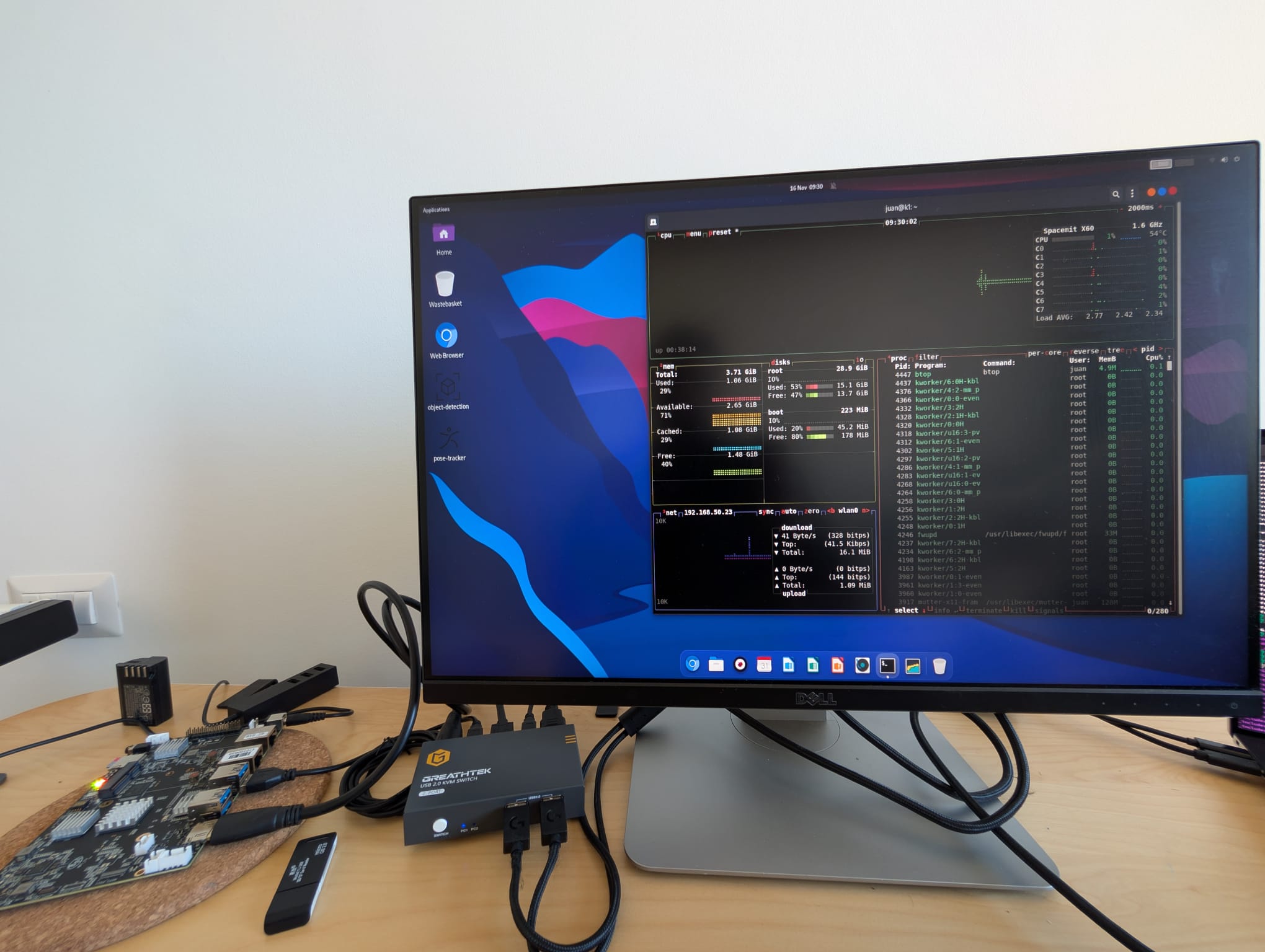
<p>The following image shows the Banana PI F3 running Bianbu OS 1.0.5. The Banana PI F3 is located on the left-hand side.</p>

<p><img src="https://raw.githubusercontent.com/jjfumero/jjfumero.github.io/refs/heads/master/files/blog/25-04-riscv/setup1.jpeg" alt="Alt text" /></p>

<p>Before discussing the entire software stack to run TornadoVM on these SBCs, let’s briefly discuss the processor and the features of each SBC.</p>

<p>As I mentioned, the CPU present in the BananaPI F3 and the Lichee PI 3 from SiPEED is the same, the Spacemit K1 processor, 
which contains 8 RISC-V cores able to run vector instructions compliant with the RVV 1.0. 
This is important, for me at least, since the software dependencies for TornadoVM to run on this hardware generate RISC-V RVV 1.0 instructions. 
There are other RISC-V boards on the market (e.g., the <a href="https://milkv.io/pioneer">Milk-V Pioneer</a>, but it implements RISC-V RVV 0.7 instead).</p>

<div class="language-bash highlighter-rouge"><div class="highlight"><pre class="highlight"><code><span class="nv">$ </span>lscpu 
Architecture:          riscv64
  Byte Order:          Little Endian
CPU<span class="o">(</span>s<span class="o">)</span>:                8
  On-line CPU<span class="o">(</span>s<span class="o">)</span> list: 0-7
Model name:            Spacemit<span class="o">(</span>R<span class="o">)</span> X60
  Thread<span class="o">(</span>s<span class="o">)</span> per core:  1
  Core<span class="o">(</span>s<span class="o">)</span> per socket:  8
  Socket<span class="o">(</span>s<span class="o">)</span>:           1
  CPU<span class="o">(</span>s<span class="o">)</span> scaling MHz:  100%
  CPU max MHz:         1600.0000
  CPU min MHz:         614.4000
Caches <span class="o">(</span><span class="nb">sum </span>of all<span class="o">)</span>:   
  L1d:                 256 KiB <span class="o">(</span>8 instances<span class="o">)</span>
  L1i:                 256 KiB <span class="o">(</span>8 instances<span class="o">)</span>
  L2:                  1 MiB <span class="o">(</span>2 instances<span class="o">)</span>
</code></pre></div></div>

<p>The Banana PI F3 that I got has 4GB of RAM, which, as we will see, can be very limiting when it comes to the installation of some of the software dependencies. 
At a later stage of the development for TornadoVM, my lab bought the Lichee PI 3 from SiPEED, which has the same processor but 16GB of RAM and 32GB of eMMC flash storage, 
which makes compilation of LLVM much easier.</p>

<p>So far, we have discussed general aspects of the RISC-V architectures, some real hardware and the OS. Now it is time to run Java.</p>

<h2 id="is-java-available-for-risc-v">Is Java available for RISC-V?</h2>

<p>Since TornadoVM accelerates Java programs, we need to run Java applications on RISC-V. 
But, is Java ready for this new CPU architecture?</p>

<p>The first port for RISC-V is <a href="https://openjdk.org/jeps/422">JEP 422</a> which supports RISC-V RV64GV (and by now, we know what these letters mean). 
This RISC-V port was originally provided by Huawei, and followed up by Alibaba, Rivos, ISCAS and Syntacore. 
It was merged for JDK 19, and it contains <a href="https://jcp.org/aboutJava/communityprocess/ec-public/materials/2024-04-24/JCP-State_of_OpenJDK_on_RISC-V.pdf">the port for the template interpreter, the C1 and C2 compilers, and all mainline GCs</a>.</p>

<p>Since TornadoVM currently uses JDK 21, <a href="https://devops.com/what-is-risc-v-and-why-has-it-become-important-for-java-2/">the RISC-V port is already included</a>, which is great news!</p>

<p>The one I am currently using is from <a href="https://bell-sw.com/pages/downloads/#jdk-21-lts">BellSoft</a>:</p>

<div class="language-bash highlighter-rouge"><div class="highlight"><pre class="highlight"><code><span class="nv">$ </span>java <span class="nt">--version</span>
openjdk 21.0.6 2025-01-21 LTS
OpenJDK Runtime Environment <span class="o">(</span>build 21.0.6+10-LTS<span class="o">)</span>
OpenJDK 64-Bit Server VM <span class="o">(</span>build 21.0.6+10-LTS, mixed mode<span class="o">)</span>
</code></pre></div></div>

<h2 id="so-can-we-run-tornadovm">So, can we run TornadoVM?</h2>

<p>TornadoVM depends on the implementation of low-level parallel programming models such as OpenCL, Level Zero or CUDA PTX. 
As far as I know, there are no Level Zero or CUDA PTX implementations for the RISC-V architecture. However, we can find some implementations for OpenCL.</p>

<p>The oneAPI Construction Kit (OCK for short), and it is defined as a framework to implement open standards for new hardware accelerators. 
OCK includes a runtime for CPUs to run OpenCL C programs as well as dispatch SPIR-V kernels. 
And this is exactly what TornadoVM needs in order to accelerate Java methods on new hardware.</p>

<p>But, not only that, OCK can also auto-vectorize OpenCL and SPIR-V programs to run on RISC-V with RVV 1.0 vector instructions, 
which can potentially increase performance of our data parallel Java methods. 
Let’s explore what vectorization means, and how it can be enabled before we start running some experiments on this platform.</p>

<h2 id="vectorization">Vectorization</h2>

<p><a href="https://ieeexplore.ieee.org/document/10812086">Vectorization</a> is a parallel computing technique that performs the same arithmetic operation on multiple data elements at a time. 
The number of elements processed in parallel depends on the processor’s vector unit capabilities, typically handling 2, 4, 8, 16, or more data items at once. 
This technique is widely used to accelerate multimedia and data-parallel applications, including LLMs these days!</p>

<p>For example, modern Intel CPUs implement <a href="https://www.intel.com/content/www/us/en/developer/articles/technical/intel-avx-512-instructions.html">AVX and AVX512</a> instructructions, 
which can compute up to 32 FP32 floats at a time.</p>

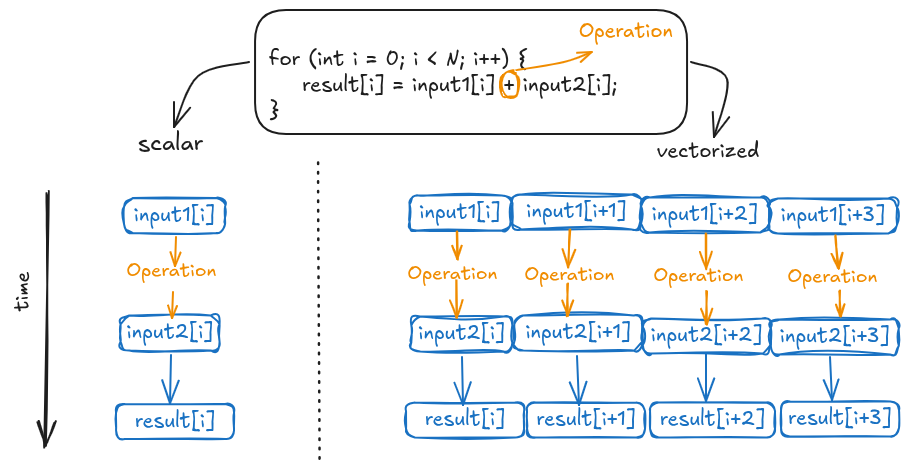
<p>The following Figure shows a high-level representation of vectorization. 
Consider a for loop performing vector addition. 
In a scalar execution, each iteration processes a single element from each array, performing the addition, and storing the result in the corresponding position.</p>

<p><img src="https://raw.githubusercontent.com/jjfumero/jjfumero.github.io/refs/heads/master/files/blog/25-04-riscv/vectorization.png" alt="Alt text" /></p>

<p>Unlike scalar operations, vectorization, as shown in the figure’s right-hand side, enables simultaneous processing of multiple data elements. 
The figure exemplifies this with a four-element operation. For illustrative purposes, we assume a single CPU clock cycle per operation, 
acknowledging that actual cycle counts depend on the operation and CPU architecture. 
However, this simplification effectively highlights the performance benefits of parallel computation. 
This speedup is achieved through replicated functional units in CPUs equipped with vector instructions.</p>

<p><strong>But how do you write vector code?</strong> There are few approaches: 
a) via libraries, what is called explicit vectorization; 
b) via constructs in a programming language or a parallel programming model (e.g., the <a href="https://cilkplus.github.io/">CilkPlus programming</a> model using the array notation); 
and c) auto-vectorization, in which compilers can generate vector code from a scalar code.</p>

<p>Each approach has its pros and cons. But the auto-vectorization approach is ideal and probably the hardest to achieve. 
Modern compilers, such as the Java C2 compiler, can auto-vectorize code for x64 and ARM64.
However, explicit use of vector units via the Java Vector API can yield to higher performance, as shown in <a href="https://dl.acm.org/doi/10.1145/3578360.3580265">this paper</a>.</p>

<p>But, what about auto-vectorization of OpenCL programs? How does it compare? The rest of the post I am going to explore this.</p>

<h2 id="workflow-for-auto-vectorization-in-tornadovm-with-ock">Workflow for auto-vectorization in TornadoVM with OCK</h2>

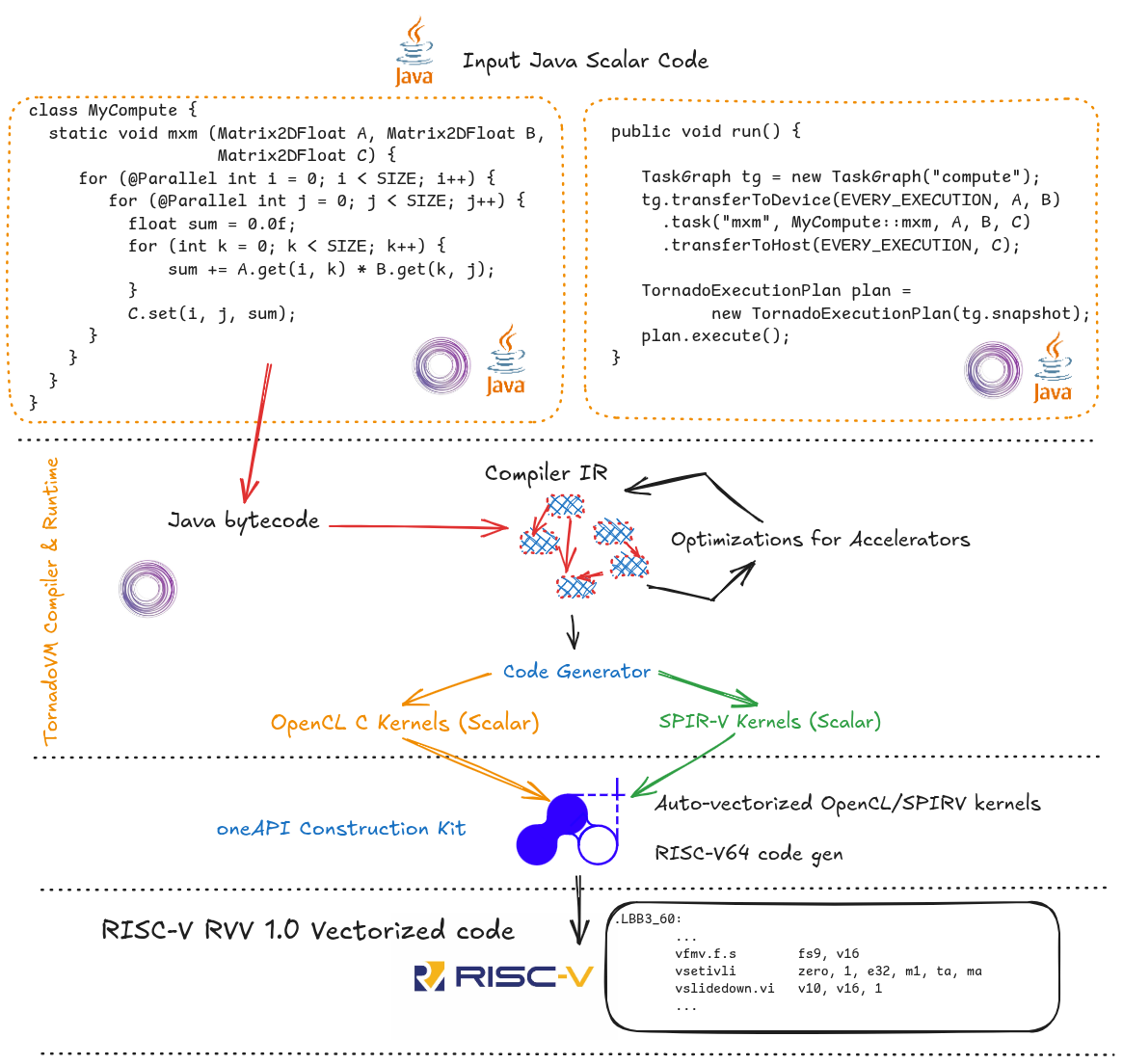
<p>TornadoVM compiles Java methods from the Java bytecode to OpenCL C, and SPIR-V binary. 
Then, the resulting optimized OpenCL/SPIR-V code is dispatched via the OpenCL runtime.</p>

<p>The compilation process is shown in the Figure below. The input application is written using the TornadoVM APIs and it contains three main parts:</p>

<ol>
  <li>Identify the parallel loops (using the @Parallel) annotation, as we can see in the left-hand side of the Figure. Note that the example represents a parallel version for the matrix multiplication, and it operates on scalar types.</li>
  <li>Task-Graph build: then we build a task graph, which contains the definition of the methods to offload, and the data involved (e.g., arrays and matrices we want to send to the accelerator).</li>
  <li>Finally, we create an execution plan from the task-graph, and execute it.</li>
</ol>

<p>This overview provides a high-level description of the TornadoVM programming model. For a more detailed exploration, including application development guidelines, please refer to one of my previous <a href="https://jjfumero.github.io/posts/2024/23/tornadovm-programming-model">posts</a>.</p>

<p>The primary objective of this article is to illustrate the compilation and execution process of TornadoVM on RISC-V, with a specific focus on auto-vectorization.</p>

<p><img src="https://raw.githubusercontent.com/jjfumero/jjfumero.github.io/refs/heads/master/files/blog/25-04-riscv/flow.png" alt="Alt text" /></p>

<p>At runtime, TornadoVM builds a graph (it is actually the Graal IR that represents all methods to offload), and optimizes the code. 
TornadoVM has a pipeline of many compiler optimizations that are interleaved with current Graal compiler optimizations. 
Some examples are loop interchange, <a href="https://www.youtube.com/watch?v=xj8Te517Wtc">data parallel loops transformations, intrinsics exploration, etc</a>.</p>

<p>Once the code has been optimized, TornadoVM generates the corresponding OpenCL C/SPIR-V codes. 
Note that the generated code is still scalar code. No auto-vectorization is applied, just yet.</p>

<p>After the code generation, TornadoVM builds the generated program via the OpenCL runtime using the <code class="language-plaintext highlighter-rouge">clBuildProgram</code>. 
In this step, the generated code is further compiled to the target selected platform. In this case, is the RISC-V 64 CPU platform using OCK.</p>

<p>OCK also contains a JIT compiler to optimize the OpenCL C/SPIR-V code for the RISC-V 64 CPU. 
In this step, the code is actually auto-vectorized. 
Thus, from the input Java scalar code, we have reached, hopefully, a vectorized code optimized for RISC-V 64. How cool is this?</p>

<p>Ok, enough talk. Let’s see this in action. 
The rest of the post I will explain how to compile LLVM, OCK and TornadoVM to run on RISC-V, and show some performance analysis of the traditional Matrix Multiplication application running on this CPU.</p>

<h2 id="building-llvm-and-ock-from-source">Building LLVM and OCK from source</h2>

<p>At the time of writing this post (April 2025), there are no prebuilts of OCK for RISC-V 64.Thus, we need to build OCK from source. 
The OCK source code is an open-source project under the <a href="https://uxlfoundation.org/">UXL Accelerated Foundation</a>, and it depends on LLVM 19, so we are going to build LLVM from source as well.</p>

<p>Configure the dependencies for LLVM and OCK:</p>

<div class="language-bash highlighter-rouge"><div class="highlight"><pre class="highlight"><code><span class="nb">sudo </span>apt <span class="nb">install </span>python3-virtualenv python3-psutil
<span class="nb">sudo </span>apt <span class="nb">install</span> <span class="nt">-y</span> build-essential git cmake libtinfo-dev python3
<span class="nb">sudo </span>apt-get <span class="nt">-y</span> <span class="nb">install </span>gcc-riscv64-linux-gnu
<span class="nb">sudo </span>apt-get <span class="nb">install </span>spirv-tools
</code></pre></div></div>

<p>Build LLVM:</p>

<div class="language-bash highlighter-rouge"><div class="highlight"><pre class="highlight"><code>git clone <span class="nt">--depth</span> 1 <span class="nt">--branch</span><span class="o">=</span>release/19.x git@github.com:llvm/llvm-project.git llvm 
git clone <span class="nt">--depth</span> 1 git@github.com:uxlfoundation/oneapi-construction-kit.git 
</code></pre></div></div>

<div class="language-bash highlighter-rouge"><div class="highlight"><pre class="highlight"><code>cmake llvm <span class="se">\</span>
<span class="nt">-Bbuild</span> <span class="nt">-GNinja</span> <span class="se">\</span>
<span class="nt">-DLLVM_ENABLE_DIA_SDK</span><span class="o">=</span>OFF <span class="se">\</span>
<span class="nt">-DCMAKE_INSTALL_PREFIX</span><span class="o">=</span>llvm_install <span class="se">\</span>
<span class="nt">-DLLVM_ENABLE_ZLIB</span><span class="o">=</span>FALSE <span class="se">\</span>
<span class="nt">-DLLVM_ENABLE_ZSTD</span><span class="o">=</span>FALSE <span class="se">\</span>
<span class="nt">-DLLVM_ENABLE_Z3_SOLVER</span><span class="o">=</span>FALSE <span class="se">\</span>
<span class="nt">-DLLVM_ENABLE_PROJECTS</span><span class="o">=</span><span class="s2">"clang;lld"</span> <span class="se">\</span>
<span class="nt">-DLLVM_TARGETS_TO_BUILD</span><span class="o">=</span><span class="s2">"RISCV"</span> <span class="se">\</span>
<span class="nt">-DCMAKE_BUILD_TYPE</span><span class="o">=</span>Release <span class="se">\</span>
<span class="nt">-DLLVM_ENABLE_ASSERTIONS</span><span class="o">=</span>ON <span class="se">\ </span><span class="nt">-DCMAKE_TOOLCHAIN_FILE</span><span class="o">=</span>/mnt/data/ock/oneapi-construction-kit/platform/riscv64-linux/riscv64-gcc-toolchain.cmake <span class="se">\</span>
<span class="nt">-DLLVM_HOST_TRIPLE</span><span class="o">=</span>riscv64-unknown-linux-gnu <span class="se">\</span>
<span class="nt">-DLLVM_BUILD_LLVM_DYLIB</span><span class="o">=</span>ON <span class="se">\</span>
<span class="nt">-DLLVM_LINK_LLVM_DYLIB</span><span class="o">=</span>ON
</code></pre></div></div>

<p>Note that the <code class="language-plaintext highlighter-rouge">-DCMAKE_TOOLCHAIN</code> needs to be pointed to the cmake file provided by OCK:</p>

<div class="language-bash highlighter-rouge"><div class="highlight"><pre class="highlight"><code><span class="nt">-DCMAKE_TOOLCHAIN_FILE</span><span class="o">=</span>/path/to/oneapi-construction-kit/platform/riscv64-linux/riscv64-gcc-toolchain.cmake 
</code></pre></div></div>

<p>Then:</p>

<div class="language-bash highlighter-rouge"><div class="highlight"><pre class="highlight"><code>ninja <span class="nt">-C</span> build <span class="nb">install</span>
</code></pre></div></div>

<h2 id="keep-an-eye-on-ram-swapping-and-thermals">Keep an eye on RAM, Swapping and Thermals</h2>

<p>If you compile LLVM on a board with only 4GB of RAM, you might end up swapping quickly. 
That was my case when I first built LLVM on the Banana PI F3 4GB. 
To avoid swapping, you can tell LLVM to build with 1 or 2 threads by adding these two flags in the configure:</p>

<div class="language-bash highlighter-rouge"><div class="highlight"><pre class="highlight"><code><span class="nt">-DLLVM_PARALLEL_LINK_JOBS</span><span class="o">=</span>1 <span class="nt">-DLLVM_PARALLEL_COMPILE_JOBS</span><span class="o">=</span>2
</code></pre></div></div>

<p>Then:</p>

<div class="language-bash highlighter-rouge"><div class="highlight"><pre class="highlight"><code><span class="nb">export </span><span class="nv">CMAKE_BUILD_PARALLEL_LEVEL</span><span class="o">=</span>1
cmake <span class="nt">--build</span> build <span class="nt">--target</span> <span class="nb">install</span>
</code></pre></div></div>

<p>Note that compilation may take some time. In fact, in my case, back and forth with some parameter tuning took ~4 days. So, be patient!</p>

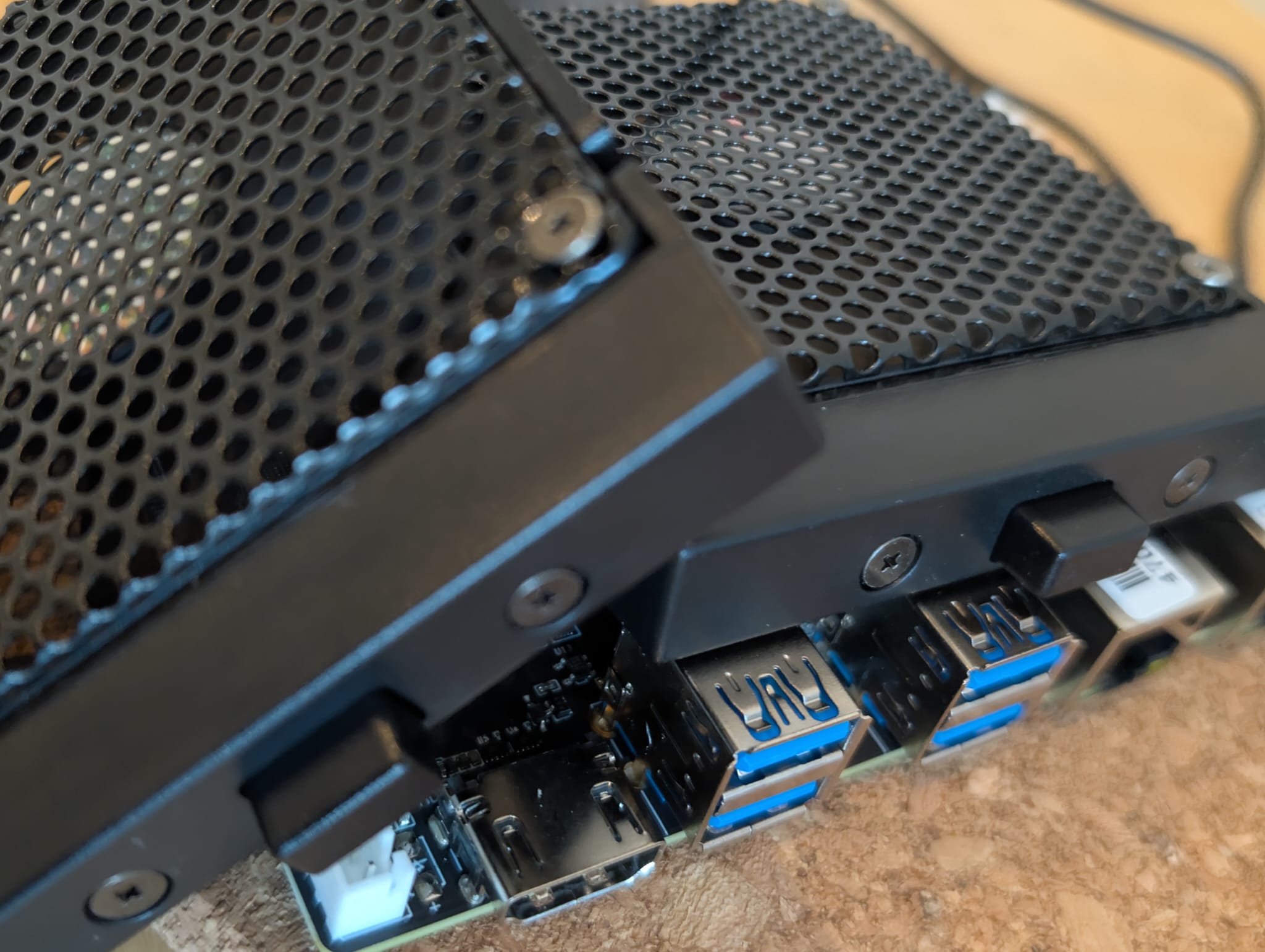
<p>Another thing to consider when compiling LLVM is temperature.
In my case, the Banana PI F3 did not come with active cooling. With the passive cooling and normal use, it is ok. 
However, compiling LLVM is another story, and I ended up using an old fan from a laptop just for the time it took to compile LLVM:</p>

<p><img src="https://raw.githubusercontent.com/jjfumero/jjfumero.github.io/refs/heads/master/files/blog/25-04-riscv/setup2.jpeg" alt="Alt text" /></p>

<h2 id="compiling-ock-for-risc-v">Compiling OCK for RISC-V</h2>

<div class="language-bash highlighter-rouge"><div class="highlight"><pre class="highlight"><code>cmake <span class="nt">-GNinja</span> <span class="nt">-Bbuild-riscv-hw-vector</span> <span class="se">\</span>
<span class="nt">-DCA_ENABLE_DEBUG_SUPPORT</span><span class="o">=</span>ON <span class="se">\</span>
<span class="nt">-DCA_LLVM_INSTALL_DIR</span><span class="o">=</span>/mnt/data/ock/llvm/llvm_install <span class="se">\</span>
<span class="nt">-DCA_ENABLE_HOST_IMAGE_SUPPORT</span><span class="o">=</span>OFF <span class="se">\</span>
<span class="nt">-DCA_ENABLE_API</span><span class="o">=</span>cl <span class="se">\</span>
<span class="nt">-DCA_CL_ENABLE_ICD_LOADER</span><span class="o">=</span>ON <span class="se">\</span>
<span class="nt">-DCMAKE_INSTALL_PREFIX</span><span class="o">=</span><span class="nv">$PWD</span>/build-riscv-hw-vector/install <span class="se">\</span>
<span class="nt">-DCA_HOST_TARGET_RISCV64_FEATURES</span><span class="o">=</span><span class="s2">"+v"</span> 

ninja <span class="nt">-C</span> build-riscv-hw-vector <span class="nb">install</span>
</code></pre></div></div>

<p>Alternatively, to build in a single thread:</p>

<div class="language-bash highlighter-rouge"><div class="highlight"><pre class="highlight"><code><span class="nb">export </span><span class="nv">CMAKE_BUILD_PARALLEL_LEVEL</span><span class="o">=</span>1
cmake <span class="nt">--build</span> build-riscv-hw-vector <span class="nt">--target</span> <span class="nb">install</span>
</code></pre></div></div>

<h2 id="final-configuration-for-opencl">Final Configuration for OpenCL</h2>

<div class="language-bash highlighter-rouge"><div class="highlight"><pre class="highlight"><code><span class="nv">$ </span><span class="nb">sudo </span>apt-get <span class="nb">install </span>clinfo 
<span class="nv">$ </span><span class="nb">cd</span> /usr/lib/riscv64-linux-gnu/
<span class="nv">$ </span><span class="nb">sudo ln</span> <span class="nt">-s</span> libOpenCL.so.1 libOpenCL.so
</code></pre></div></div>

<p>Additionally, create a new file under <code class="language-plaintext highlighter-rouge">/etc/OpenCL/vendors/</code> with the path to the <code class="language-plaintext highlighter-rouge">libCL.so</code> that OCK generates.</p>

<div class="language-bash highlighter-rouge"><div class="highlight"><pre class="highlight"><code><span class="nb">cat</span> /etc/OpenCL/vendors/ock.icd 
/mnt/data/ock/oneapi-construction-kit/build-riscv-hw-vector/install/lib/libCL.so
</code></pre></div></div>

<p>Now we can run OpenCL!</p>

<div class="language-bash highlighter-rouge"><div class="highlight"><pre class="highlight"><code><span class="nv">$ </span>clinfo                         
Number of platforms                               1
  Platform Name                                   ComputeAorta
  Platform Vendor                                 Codeplay Software Ltd.
  Platform Version                                OpenCL 3.0 ComputeAorta 4.0.0 Linux riscv64 <span class="o">(</span>Release, 08207aa8<span class="o">)</span>
  Platform Profile                                FULL_PROFILE
  Platform Extensions                             cl_codeplay_kernel_exec_info cl_codeplay_soft_math cl_khr_create_command_queue cl_khr_icd cl_codeplay_extra_build_options
  Platform Extensions with Version                cl_codeplay_kernel_exec_info                                       0x1000 <span class="o">(</span>0.1.0<span class="o">)</span>
                                                  cl_codeplay_soft_math                                              0x1000 <span class="o">(</span>0.1.0<span class="o">)</span>
                                                  cl_khr_create_command_queue                                      0x400000 <span class="o">(</span>1.0.0<span class="o">)</span>
                                                  cl_khr_icd                                                       0x400000 <span class="o">(</span>1.0.0<span class="o">)</span>
                                                  cl_codeplay_extra_build_options                                    0x6000 <span class="o">(</span>0.6.0<span class="o">)</span>
  Platform Numeric Version                        0xc00000 <span class="o">(</span>3.0.0<span class="o">)</span>
  Platform Extensions <span class="k">function </span>suffix             CODEPLAY
  Platform Host timer resolution                  0ns
</code></pre></div></div>

<p>Now we are ready to build TornadoVM for RISC-V.</p>

<h2 id="build-tornadovm-for-risc-v">Build TornadoVM for RISC-V</h2>

<p>Although TornadoVM is just a Java program, it contains some dependencies that are not fully ported to RISC-V. 
However, with a small patch, TornadoVM can be installed on RISC-V systems. 
TornadoVM provides an automatic script to download and patch the code for RISC-V.</p>

<p>First, create a new Python environment:</p>

<div class="language-bash highlighter-rouge"><div class="highlight"><pre class="highlight"><code><span class="nv">$ </span>python3 <span class="nt">-m</span> venv /mnt/data/python-env 
<span class="nv">$ </span><span class="nb">source</span> /mnt/data/python-env/bin/activate
<span class="nv">$ </span>pip3 <span class="nb">install </span>lit
</code></pre></div></div>

<p>Then, clone TornadoVM and build it with the patch for RISC-V (updated for TornadoVM <code class="language-plaintext highlighter-rouge">v1.1.1-dev</code>).</p>

<div class="language-bash highlighter-rouge"><div class="highlight"><pre class="highlight"><code><span class="c">## Clone TornadoVM Repo</span>
<span class="nv">$ </span>git clone https://github.com/beehive-lab/TornadoVM.git

<span class="c">## Clone TornadoVM patch repo: </span>
<span class="nv">$ </span>git clone https://github.com/beehive-lab/tornadovm-riscv-patch.git

<span class="c">## Build for OpenCL only</span>
<span class="nv">$ </span>bash tornadovm-riscv-patch/apply-riscv-patch-opencl.sh 

<span class="c">## Build for OpenCL and SPIR-V </span>
<span class="nv">$ </span>bash tornadovm-riscv-patch/apply-riscv-patch-spirv.sh 

<span class="nv">$ </span><span class="nb">source </span>setvars.sh 
</code></pre></div></div>

<div class="language-bash highlighter-rouge"><div class="highlight"><pre class="highlight"><code>tornado <span class="nt">--devices</span>

Number of Tornado drivers: 1
Driver: OpenCL1
  Total number of OpenCL devices  : 1
  Tornado <span class="nv">device</span><span class="o">=</span>0:0  <span class="o">(</span>DEFAULT<span class="o">)</span>
        OPENCL <span class="nt">--</span>  <span class="o">[</span>ComputeAorta] <span class="nt">--</span> ComputeAorta riscv64
                Global Memory Size: 3.9 GB
                Local Memory Size: 32.0 KB
                Workgroup Dimensions: 3
                Total Number of Block Threads: <span class="o">[</span>1024]
                Max WorkGroup Configuration: <span class="o">[</span>1024, 1024, 1024]
                Device OpenCL C version: OpenCL C 1.2 Clang 19.1.7
</code></pre></div></div>

<p><strong>Congratulations!</strong> TornadoVM running on RISC-V with OCK. Now, we can run a few experiments and check some performance.</p>

<h2 id="checking-vector-instructions-for-risc-v">Checking Vector Instructions for RISC-V</h2>

<p>We can generate the assembly that the OCK generates from the OpenCL C kernel that TornadoVM generates by enabling the following env variable:</p>

<div class="language-bash highlighter-rouge"><div class="highlight"><pre class="highlight"><code><span class="nb">export </span><span class="nv">CA_HOST_DUMP_ASM</span><span class="o">=</span>1
</code></pre></div></div>

<p>Then, we can run any example with TornadoVM, and we will see the generated RISC-V assembly code. For example:</p>

<div class="language-bash highlighter-rouge"><div class="highlight"><pre class="highlight"><code>tornado <span class="nt">-m</span> tornado.examples/uk.ac.manchester.tornado.examples.compute.MatrixMultiplication2D 256
</code></pre></div></div>

<p>The RISC-V generated code can be very large. But we can see that in some parts of the code vector instructions are used:</p>

<div class="language-bash highlighter-rouge"><div class="highlight"><pre class="highlight"><code>.LBB3_33:
        add     t5, a4, a5
        add     t5, t5, s4
        vsetvli zero, zero, e64, m8, ta, ma
        vadd.vx v24, v8, t5
        vsetvli zero, zero, e32, m4, ta, ma
        vnsrl.wi        v20, v24, 0
        vmslt.vx        v0, v20, s8
        vsetvli zero, zero, e16, m2, ta, ma
        vmv.x.s a1, v0
        slli    a1, a1, 48
        beqz    a1, .LBB3_32
        vsetvli zero, zero, e64, m8, ta, ma
        li      a1, 32
        vsll.vx v24, v24, a1
        vsra.vx v24, v24, a1
        j       .LBB3_36
.LBB3_35:
        vsetvli zero, zero, e64, m8, ta, ma
        vadd.vx v24, v24, s2
        vmslt.vx        v20, v24, s8
        vmand.mm        v0, v20, v0
        vsetvli zero, zero, e16, m2, ta, ma
        vmv.x.s a1, v0
        slli    a1, a1, 48
        add     t5, t5, s2
        beqz    a1, .LBB3_32
</code></pre></div></div>

<p>Let’s see how this can impact performance.</p>

<h2 id="preliminary-results-on-risc-v">Preliminary Results on RISC-V</h2>

<p>Let’s run an experiment and see the performance we get by enabling auto-vectorization with TornadoVM and OCK. 
We are going to run the Matrix Multiplication, a common algorithm widely used these days for AI and LLMs.</p>

<p>I run this Benchmark on the RISC-V Banana PI F3 with 4GB of RAM. The OS is Bianbu 1.0.5, TornadoVM 1.0.10 and OCK commit <code class="language-plaintext highlighter-rouge">65036b8</code>. 
LLVM 19.1.5 and GCC 13.2. The OpenJDK used is 21.0.5.</p>

<p>You can obtain the benchmark from the GitHub repository:</p>

<div class="language-bash highlighter-rouge"><div class="highlight"><pre class="highlight"><code><span class="nv">$ </span>git clone https://github.com/beehive-lab/tornadovm-benchmarks
<span class="nv">$ </span><span class="nb">cd </span>tornado-benchmarks
<span class="nv">$ </span>./build.sh
</code></pre></div></div>

<p>To run, you need to copy the <code class="language-plaintext highlighter-rouge">setvars.sh</code> from the TornadoVM installation:</p>

<div class="language-bash highlighter-rouge"><div class="highlight"><pre class="highlight"><code><span class="nb">cp</span> /path/to/tornadovm/setvars.sh <span class="nb">.</span> 
<span class="nb">source </span>setvars.sh
./run.sh mxm 
</code></pre></div></div>

<p>The following plot shows the run-time distribution for the 100 runs. 
Note that TornadoVM compiles the Java code in the first iteration, and then it runs directly with the compiled code.</p>

<p>The performance plot is read as follows. 
The x axis shows different data sizes for the matrix multiplication. 
Each size was evaluated with Java single threaded, Java with parallel streams, and then TornadoVM using the OpenCL backend and TornadoVM using the SPIR-V backend. The y-axis shows runtime in nanoseconds. 
Thus, the lower, the better.</p>

<p><img src="https://raw.githubusercontent.com/jjfumero/jjfumero.github.io/refs/heads/master/files/blog/25-04-riscv/results.png" alt="Alt text" /></p>

<p>For small matrices, the Java sequential version performs very well. 
The cost of multi-threading and runtime thread-scheduling are not worth it for small data sizes. 
There is no auto-vectorization for the Java code, as in April 2025. 
The Java streams version performs up to 8x in this 8-core machine.</p>

<p>However, for <strong>TornadoVM, performance is even higher, up to 32x faster than Java Sequential, and up to 4x faster than Java Streams</strong> for the same CPU. 
This is the effect of the auto-vectorizer and the multi-threaded execution. 
Another highlight is that, for large matrix sizes (e.g., 512 and 1024) even the first iteration (which includes optimization and compilation) runs faster than the parallel stream execution.</p>

<h2 id="conclusions">Conclusions</h2>

<p>This post has shown a general introduction to RISC-V, the modularity of RISC-V processors and a high-level overview of how ready is Java to run on RISC-V. 
Additionally, this post has shown how to increase performance of data parallel applications written in Java using TornadoVM and the oneAPI Construction Kit to exploit auto-vectorization in RISC-V processors.</p>

<p>The preliminary results from the Matrix Multiplication benchmark show a substantial speedup with TornadoVM compared to sequential Java and Java streams, highlighting the effectiveness of auto-vectorization and multi-threaded execution on RISC-V. 
While challenges exist, such as the need to build software from source and manage limited resources, the advancements in hardware availability and software support make RISC-V a very appealing platform for many developers, including Java developers.</p>

<h2 id="discussions">Discussions</h2>

<p>If you are interested, let’s keep the discussions active:</p>

<p><a href="https://github.com/jjfumero/jjfumero.github.io/discussions/15">https://github.com/jjfumero/jjfumero.github.io/discussions/15</a></p>

<h2 id="appendix">Appendix</h2>

<p>When using LLVM 19.1.7, I noticed an error in a duplicated definition. The error is as follows:</p>

<div class="language-bash highlighter-rouge"><div class="highlight"><pre class="highlight"><code>/mnt/data/ock/oneapi-construction-kit/modules/compiler/builtins/source/builtins.cl:10675:27: error: conflicting types <span class="k">for</span> <span class="s1">'printf'</span>
 10675 | int __attribute__<span class="o">((</span>weak<span class="o">))</span> <span class="nb">printf</span><span class="o">(</span>const constant char <span class="k">*</span>const restrict <span class="nb">fmt</span>, ...<span class="o">)</span><span class="p">;</span>
       |                           ^
/mnt/data/ock/oneapi-construction-kit/modules/compiler/builtins/include/builtins/builtins.h:16367:27: note: previous declaration is here
 16367 | int __attribute__<span class="o">((</span>weak<span class="o">))</span> <span class="nb">printf</span><span class="o">(</span>const constant char<span class="k">*</span> const restrict <span class="nb">fmt</span>, ...<span class="o">)</span><span class="p">;</span>
       |                           ^
1 error generated.
<span class="o">[</span>6/4830] Building CXX object modules/compiler/compiler_pipeline/CMakeFiles/compiler-pipeline.dir/source/define_mux_dma_pass.cpp.o^C
</code></pre></div></div>

<p>By removing one of these definitions, you can build OCK:</p>

<div class="language-diff highlighter-rouge"><div class="highlight"><pre class="highlight"><code><span class="gh">diff --git a/modules/compiler/builtins/source/builtins.cl b/modules/compiler/builtins/source/builtins.cl
index 1c96f2d1..2ef30343 100644
</span><span class="gd">--- a/modules/compiler/builtins/source/builtins.cl
</span><span class="gi">+++ b/modules/compiler/builtins/source/builtins.cl
</span><span class="p">@@ -10672,7 +10672,7 @@</span> void __CL_BUILTIN_ATTRIBUTES prefetch(const global double16 *pointer,
 
 /*-=-=-=-=-=-=-=-=-=-=-=-=-=-=-=-=-=-=-=-=-=-=-*/
 
<span class="gd">-int __attribute__((weak)) printf(const constant char *const restrict fmt, ...);
</span><span class="gi">+//int __attribute__((weak)) printf(const constant char *const restrict fmt, ...);
</span> 
 /*-=-=-=-=-=-=-=-=-=-=-=-=-=-=-=-=-=-=-=-=-=-=-*/
</code></pre></div></div>

<p>Compile again:</p>

<div class="language-bash highlighter-rouge"><div class="highlight"><pre class="highlight"><code>ninja <span class="nt">-C</span> build <span class="nb">install</span>
</code></pre></div></div>]]></content><author><name>Juan Fumero, PhD</name><email>juan@jfumero.dev</email></author><category term="RISCV" /><category term="Java" /><category term="OCK" /><category term="TornadoVM" /><category term="Vectorization" /><category term="Performance" /><summary type="html"><![CDATA[Learn how to accelerate performance on RISC-V CPUs using TornadoVM & vector instructions]]></summary></entry><entry><title type="html">Building JDK with HSDIS on Linux</title><link href="https://jfumero.dev/posts/2025/02/14/jdk-hsdis-build" rel="alternate" type="text/html" title="Building JDK with HSDIS on Linux" /><published>2025-02-14T00:00:00+00:00</published><updated>2025-02-14T00:00:00+00:00</updated><id>https://jfumero.dev/posts/2025/02/14/jdk-hsdis-build</id><content type="html" xml:base="https://jfumero.dev/posts/2025/02/14/jdk-hsdis-build"><![CDATA[<h2 id="intro">Intro</h2>

<p><a href="https://github.com/openjdk/jdk/tree/master/src/utils/hsdis"><code class="language-plaintext highlighter-rouge">hsdis</code></a> is a disassembler plugin for the HotSpot JVM (Java Virtual Machine). 
The <code class="language-plaintext highlighter-rouge">hsdis</code> plugin is very useful for some Java developers that want to see the code generated by the JVM’s 
Just-In-Time (JIT) compiler into human-readable assembly language. 
Unfortunately, this plugin is not included out of the box with JDK (Java Development Kit), so we need to 
build our own JDK and enable the <code class="language-plaintext highlighter-rouge">hsdis</code> plugin manually.</p>

<p>In this post, I’ll walk you through the process of building <code class="language-plaintext highlighter-rouge">hsdis</code> for both the latest JDK 
(JDK 25 at the time of writing) and the latest Long-Term Support (LTS) version, JDK 21.<br />
I’ll focus on a Linux environment, so get your terminal ready!</p>

<h2 id="getting-the-dependencies">Getting the dependencies</h2>

<h3 id="for-fedora-41">For Fedora 41:</h3>

<div class="language-bash highlighter-rouge"><div class="highlight"><pre class="highlight"><code><span class="nb">sudo </span>dnf <span class="nb">install </span>autoconf alsa-lib-devel cups-devel libXtst-devel libXt-devel libXrender-devel libXrandr-devel libXi-devel

<span class="nb">sudo </span>dnf <span class="nb">install </span>gmp gmp-devel mpfr mpfr-devel libmpc libmpc-devel
</code></pre></div></div>

<h3 id="for-ubuntu-2404-lts">For Ubuntu 24.04 LTS:</h3>

<div class="language-bash highlighter-rouge"><div class="highlight"><pre class="highlight"><code><span class="nb">sudo </span>apt-get <span class="nb">install </span>autoconf libasound2-dev libcups2-dev libfontconfig1-dev libx11-dev libxext-dev libxrender-dev libxrandr-dev libxtst-dev libxt-dev texinfo 
<span class="nb">sudo </span>apt-get <span class="nb">install </span>libmpfr-dev libmpc-dev libgmp-dev
</code></pre></div></div>

<h2 id="get-binutils">Get Binutils</h2>

<p>Clone the <a href="https://www.gnu.org/software/binutils/"><code class="language-plaintext highlighter-rouge">binutils</code></a> project:</p>

<div class="language-bash highlighter-rouge"><div class="highlight"><pre class="highlight"><code><span class="nb">cd</span> ~/bin/jdk/binutils/
git clone git://sourceware.org/git/binutils-gdb.git
<span class="nb">export </span><span class="nv">BIN_UTILS_DIR</span><span class="o">=</span><span class="nv">$PWD</span>/binutils-gdb
</code></pre></div></div>

<h2 id="build-a-jdk-with-hsdis-from-the-master-branch-eg-jdk-25">Build a JDK with HSDIS from the <code class="language-plaintext highlighter-rouge">master</code> branch (e.g., JDK 25)</h2>

<p>Clone the JDK repo:</p>

<div class="language-bash highlighter-rouge"><div class="highlight"><pre class="highlight"><code><span class="nb">cd</span> ~/bin/jdk
git clone https://github.com/openjdk/jdk.git
<span class="nb">cd </span>jdk
</code></pre></div></div>

<p>And run the <code class="language-plaintext highlighter-rouge">configure</code> script with the following options:</p>

<div class="language-bash highlighter-rouge"><div class="highlight"><pre class="highlight"><code>bash configure <span class="nt">--with-hsdis</span><span class="o">=</span>binutils <span class="nt">--with-binutils-src</span><span class="o">=</span><span class="nv">$BIN_UTILS_DIR</span>
</code></pre></div></div>

<p>If the configure is correct, then we can start the build:</p>

<div class="language-bash highlighter-rouge"><div class="highlight"><pre class="highlight"><code>make clean
make images 
make build-hsdis
make install-hsdis 
</code></pre></div></div>

<p>Finally, we load environment for the new JDK:</p>

<div class="language-bash highlighter-rouge"><div class="highlight"><pre class="highlight"><code><span class="nv">$ </span><span class="nb">export </span><span class="nv">JAVA_HOME</span><span class="o">=</span><span class="nv">$PWD</span>/build/linux-x86_64-server-release/jdk/
<span class="nv">$ </span><span class="nb">export </span><span class="nv">PATH</span><span class="o">=</span><span class="nv">$JAVA_HOME</span>/bin:<span class="nv">$PATH</span>

<span class="c">## Check </span>
<span class="nv">$ </span>java <span class="nt">--version</span>

openjdk 25-internal 2025-09-16
OpenJDK Runtime Environment <span class="o">(</span>build 25-internal-adhoc.juan.jdk<span class="o">)</span>
OpenJDK 64-Bit Server VM <span class="o">(</span>build 25-internal-adhoc.juan.jdk, mixed mode<span class="o">)</span>
</code></pre></div></div>

<h2 id="build-hsdis-for-jdk-21">Build <code class="language-plaintext highlighter-rouge">hsdis</code> for JDK 21</h2>

<p>The configuration process is almost identical to the upstream version, except that we need a specific version of <code class="language-plaintext highlighter-rouge">binutils</code>, 
the 2.37 in order to build JDK21.</p>

<div class="language-bash highlighter-rouge"><div class="highlight"><pre class="highlight"><code><span class="nb">cd </span>BIN_UTILS_DIR
git checkout binutils-2_37
</code></pre></div></div>

<p>Besides, we can obtain an updated version of JDK 21 by changing the repository:</p>

<div class="language-bash highlighter-rouge"><div class="highlight"><pre class="highlight"><code><span class="nb">cd</span> ~/bin/jdk
git clone https://github.com/openjdk/jdk21u-dev.git
<span class="nb">cd </span>jdk21u-dev
</code></pre></div></div>

<p>I am going to use the JDK 21+6 update:</p>

<div class="language-bash highlighter-rouge"><div class="highlight"><pre class="highlight"><code>git checkout jdk-21.0.6-ga
</code></pre></div></div>

<p>Now, we can use the same command as the one used to build the upstream version:</p>

<div class="language-bash highlighter-rouge"><div class="highlight"><pre class="highlight"><code>bash configure <span class="nt">--with-hsdis</span><span class="o">=</span>binutils <span class="nt">--with-binutils-src</span><span class="o">=</span><span class="nv">$BIN_UTILS_DIR</span>
make clean
make images 
make build-hsdis
make install-hsdis 
</code></pre></div></div>

<p>Finally, we load the environment:</p>

<div class="language-bash highlighter-rouge"><div class="highlight"><pre class="highlight"><code><span class="nv">$ </span><span class="nb">export </span><span class="nv">JAVA_HOME</span><span class="o">=</span><span class="nv">$PWD</span>/build/linux-x86_64-server-release/jdk/
<span class="nv">$ </span><span class="nb">export </span><span class="nv">PATH</span><span class="o">=</span><span class="nv">$JAVA_HOME</span>/bin:<span class="nv">$PATH</span>

<span class="c">## Check </span>
<span class="nv">$ </span>java <span class="nt">--version</span>

openjdk 21.0.6-internal 2025-01-21
OpenJDK Runtime Environment <span class="o">(</span>build 21.0.6-internal-adhoc.juan.jdk21u-dev<span class="o">)</span>
OpenJDK 64-Bit Server VM <span class="o">(</span>build 21.0.6-internal-adhoc.juan.jdk21u-dev, mixed mode<span class="o">)</span>
</code></pre></div></div>

<h2 id="enabling-the-disassembler-an-example">Enabling the Disassembler: An Example</h2>

<p>Let’s write an example and see the disassembler in action:</p>

<div class="language-java highlighter-rouge"><div class="highlight"><pre class="highlight"><code><span class="kd">public</span> <span class="kd">class</span> <span class="nc">SampleCompute</span> <span class="o">{</span>

  <span class="kd">public</span> <span class="kd">static</span> <span class="kt">void</span> <span class="nf">main</span><span class="o">(</span><span class="nc">String</span><span class="o">[]</span> <span class="n">args</span><span class="o">)</span> <span class="o">{</span>
    <span class="nc">SampleCompute</span> <span class="n">compute</span> <span class="o">=</span> <span class="k">new</span> <span class="nc">SampleCompute</span><span class="o">();</span>
    <span class="kt">int</span><span class="o">[]</span> <span class="n">array</span> <span class="o">=</span> <span class="k">new</span> <span class="kt">int</span><span class="o">[</span><span class="mi">100_000</span><span class="o">];</span>
    <span class="k">for</span><span class="o">(</span><span class="kt">int</span> <span class="n">i</span> <span class="o">=</span> <span class="mi">0</span><span class="o">;</span> <span class="n">i</span> <span class="o">&lt;</span> <span class="n">array</span><span class="o">.</span><span class="na">length</span><span class="o">;</span> <span class="n">i</span><span class="o">++)</span> <span class="o">{</span>
    	<span class="n">array</span><span class="o">[</span><span class="n">i</span><span class="o">]</span> <span class="o">=</span> <span class="n">compute</span><span class="o">.</span><span class="na">compute</span><span class="o">(</span><span class="n">i</span><span class="o">);</span>
    <span class="o">}</span>
  <span class="o">}</span>

  <span class="kd">private</span> <span class="kt">int</span> <span class="nf">compute</span><span class="o">(</span><span class="kt">int</span> <span class="n">i</span><span class="o">)</span> <span class="o">{</span>
	<span class="k">return</span> <span class="o">(</span><span class="n">i</span> <span class="o">*</span> <span class="n">i</span><span class="o">)</span> <span class="o">+</span> <span class="n">i</span><span class="o">;</span>
  <span class="o">}</span>
<span class="o">}</span>
</code></pre></div></div>

<p>We compile the program with <code class="language-plaintext highlighter-rouge">javac</code> as usual:</p>

<div class="language-bash highlighter-rouge"><div class="highlight"><pre class="highlight"><code>javac SampleCompute.java 
</code></pre></div></div>

<p>To enable the assembler, we run <code class="language-plaintext highlighter-rouge">java</code> with the <code class="language-plaintext highlighter-rouge">-XX:+UnlockDiagnosticVMOptions -XX:+PrintAssembly</code> options:</p>

<div class="language-bash highlighter-rouge"><div class="highlight"><pre class="highlight"><code>java <span class="nt">-XX</span>:+UnlockDiagnosticVMOptions <span class="nt">-XX</span>:+PrintAssembly SampleCompute
</code></pre></div></div>

<p>This is very verbose because it dumps into the standard output all methods compiled. However, it is possible to add filters for specific methods using the <code class="language-plaintext highlighter-rouge">-XX:CompileCommand='print,MyKlass::method’</code> option. For example, the following code snippet only enables the assembly dump for the <code class="language-plaintext highlighter-rouge">compute</code> method.</p>

<div class="language-bash highlighter-rouge"><div class="highlight"><pre class="highlight"><code>java <span class="nt">-XX</span>:+UnlockDiagnosticVMOptions <span class="nt">-XX</span>:CompileCommand<span class="o">=</span><span class="s1">'print,SampleCompute.compute'</span> SampleCompute 
</code></pre></div></div>

<p>Sample output:</p>

<div class="language-bash highlighter-rouge"><div class="highlight"><pre class="highlight"><code>CompileCommand: print SampleCompute.compute bool print <span class="o">=</span> <span class="nb">true</span>

<span class="o">=============================</span> C1-compiled nmethod <span class="o">==============================</span>
<span class="nt">-----------------------------------</span> Assembly <span class="nt">-----------------------------------</span>

Compiled method <span class="o">(</span>c1<span class="o">)</span> 73  477       3       SampleCompute::compute <span class="o">(</span>6 bytes<span class="o">)</span>
 total <span class="k">in </span>heap  <span class="o">[</span>0x00007f8eb909e290,0x00007f8eb909e580] <span class="o">=</span> 752
 relocation     <span class="o">[</span>0x00007f8eb909e3e8,0x00007f8eb909e418] <span class="o">=</span> 48
 main code      <span class="o">[</span>0x00007f8eb909e420,0x00007f8eb909e4f8] <span class="o">=</span> 216
 stub code      <span class="o">[</span>0x00007f8eb909e4f8,0x00007f8eb909e528] <span class="o">=</span> 48
 oops           <span class="o">[</span>0x00007f8eb909e528,0x00007f8eb909e530] <span class="o">=</span> 8
 metadata       <span class="o">[</span>0x00007f8eb909e530,0x00007f8eb909e538] <span class="o">=</span> 8
 scopes data    <span class="o">[</span>0x00007f8eb909e538,0x00007f8eb909e548] <span class="o">=</span> 16
 scopes pcs     <span class="o">[</span>0x00007f8eb909e548,0x00007f8eb909e578] <span class="o">=</span> 48
 dependencies   <span class="o">[</span>0x00007f8eb909e578,0x00007f8eb909e580] <span class="o">=</span> 8

<span class="o">[</span>Disassembly]
<span class="nt">--------------------------------------------------------------------------------</span>
<span class="o">[</span>Constant Pool <span class="o">(</span>empty<span class="o">)]</span>

<span class="nt">--------------------------------------------------------------------------------</span>

<span class="o">[</span>Entry Point]
  <span class="c"># {method} {0x00007f8e90700320} 'compute' '(I)I' in 'SampleCompute'</span>
  <span class="c"># this:     rsi:rsi   = 'SampleCompute'</span>
  <span class="c"># parm0:    rdx       = int</span>
  <span class="c">#           [sp+0x30]  (sp of caller)</span>
  0x00007f8eb909e420:   mov    0x8<span class="o">(</span>%rsi<span class="o">)</span>,%r10d
  0x00007f8eb909e424:   shl    <span class="nv">$0x3</span>,%r10
  0x00007f8eb909e428:   cmp    %rax,%r10
  0x00007f8eb909e42b:   jne    0x00007f8ec04ad080           <span class="p">;</span>   <span class="o">{</span>runtime_call ic_miss_stub<span class="o">}</span>
  0x00007f8eb909e431:   data16 data16 nopw 0x0<span class="o">(</span>%rax,%rax,1<span class="o">)</span>
  0x00007f8eb909e43c:   data16 data16 xchg %ax,%ax
<span class="o">[</span>Verified Entry Point]
  0x00007f8eb909e440:   mov    %eax,-0x14000<span class="o">(</span>%rsp<span class="o">)</span>
  0x00007f8eb909e447:   push   %rbp
  0x00007f8eb909e448:   sub    <span class="nv">$0x20</span>,%rsp
  0x00007f8eb909e44c:   cmpl   <span class="nv">$0x1</span>,0x20<span class="o">(</span>%r15<span class="o">)</span>
  0x00007f8eb909e454:   je     0x00007f8eb909e45b
  0x00007f8eb909e456:   call   Stub::nmethod_entry_barrier  <span class="p">;</span>   <span class="o">{</span>runtime_call StubRoutines <span class="o">(</span>final stubs<span class="o">)}</span>
  0x00007f8eb909e45b:   movabs <span class="nv">$0x7f8e907004c0</span>,%rax         <span class="p">;</span>   <span class="o">{</span>metadata<span class="o">(</span>method data <span class="k">for</span> <span class="o">{</span>method<span class="o">}</span> <span class="o">{</span>0x00007f8e90700320<span class="o">}</span> <span class="s1">'compute'</span> <span class="s1">'(I)I'</span> <span class="k">in</span> <span class="s1">'SampleCompute'</span><span class="o">)}</span>
  0x00007f8eb909e465:   mov    0xf4<span class="o">(</span>%rax<span class="o">)</span>,%edi
  0x00007f8eb909e46b:   add    <span class="nv">$0x2</span>,%edi
  0x00007f8eb909e46e:   mov    %edi,0xf4<span class="o">(</span>%rax<span class="o">)</span>
  0x00007f8eb909e474:   and    <span class="nv">$0x7fe</span>,%edi
  0x00007f8eb909e47a:   <span class="nb">test</span>   %edi,%edi
  0x00007f8eb909e47c:   je     0x00007f8eb909e49d
  0x00007f8eb909e482:   mov    %rdx,%rax
  0x00007f8eb909e485:   imul   %edx,%eax
  0x00007f8eb909e488:   add    %edx,%eax
  0x00007f8eb909e48a:   add    <span class="nv">$0x20</span>,%rsp
  0x00007f8eb909e48e:   pop    %rbp
  0x00007f8eb909e48f:   cmp    0x448<span class="o">(</span>%r15<span class="o">)</span>,%rsp             <span class="p">;</span>   <span class="o">{</span>poll_return<span class="o">}</span>
  0x00007f8eb909e496:   ja     0x00007f8eb909e4bb
  0x00007f8eb909e49c:   ret    
  0x00007f8eb909e49d:   movabs <span class="nv">$0x7f8e90700320</span>,%r10         <span class="p">;</span>   <span class="o">{</span>metadata<span class="o">({</span>method<span class="o">}</span> <span class="o">{</span>0x00007f8e90700320<span class="o">}</span> <span class="s1">'compute'</span> <span class="s1">'(I)I'</span> <span class="k">in</span> <span class="s1">'SampleCompute'</span><span class="o">)}</span>
  0x00007f8eb909e4a7:   mov    %r10,0x8<span class="o">(</span>%rsp<span class="o">)</span>
  0x00007f8eb909e4ac:   movq   <span class="nv">$0xffffffffffffffff</span>,<span class="o">(</span>%rsp<span class="o">)</span>
  0x00007f8eb909e4b4:   call   0x00007f8ec0570a00           <span class="p">;</span> ImmutableOopMap <span class="o">{</span><span class="nv">rsi</span><span class="o">=</span>Oop <span class="o">}</span>
                                                            <span class="p">;</span><span class="k">*</span>synchronization entry
                                                            <span class="p">;</span> - SampleCompute::compute@-1 <span class="o">(</span>line 12<span class="o">)</span>
                                                            <span class="p">;</span>   <span class="o">{</span>runtime_call counter_overflow Runtime1 stub<span class="o">}</span>
  0x00007f8eb909e4b9:   jmp    0x00007f8eb909e482
  0x00007f8eb909e4bb:   movabs <span class="nv">$0x7f8eb909e48f</span>,%r10         <span class="p">;</span>   <span class="o">{</span>internal_word<span class="o">}</span>
  0x00007f8eb909e4c5:   mov    %r10,0x460<span class="o">(</span>%r15<span class="o">)</span>
  0x00007f8eb909e4cc:   jmp    0x00007f8ec04b4000           <span class="p">;</span>   <span class="o">{</span>runtime_call SafepointBlob<span class="o">}</span>
  0x00007f8eb909e4d1:   mov    0x4f8<span class="o">(</span>%r15<span class="o">)</span>,%rax
  0x00007f8eb909e4d8:   movq   <span class="nv">$0x0</span>,0x4f8<span class="o">(</span>%r15<span class="o">)</span>
  0x00007f8eb909e4e3:   movq   <span class="nv">$0x0</span>,0x500<span class="o">(</span>%r15<span class="o">)</span>
  0x00007f8eb909e4ee:   add    <span class="nv">$0x20</span>,%rsp
  0x00007f8eb909e4f2:   pop    %rbp
  0x00007f8eb909e4f3:   jmp    0x00007f8ec056ac00           <span class="p">;</span>   <span class="o">{</span>runtime_call unwind_exception Runtime1 stub<span class="o">}</span>
<span class="o">[</span>Exception Handler]
  0x00007f8eb909e4f8:   call   0x00007f8ec056d900           <span class="p">;</span>   <span class="o">{</span>no_reloc<span class="o">}</span>
  0x00007f8eb909e4fd:   movabs <span class="nv">$0x7f8ed0349604</span>,%rdi         <span class="p">;</span>   <span class="o">{</span>external_word<span class="o">}</span>
  0x00007f8eb909e507:   and    <span class="nv">$0xfffffffffffffff0</span>,%rsp
  0x00007f8eb909e50b:   call   0x00007f8ecfb79340           <span class="p">;</span>   <span class="o">{</span>runtime_call MacroAssembler::debug64<span class="o">(</span>char<span class="k">*</span>, long, long<span class="k">*</span><span class="o">)}</span>
  0x00007f8eb909e510:   hlt    
<span class="o">[</span>Deopt Handler Code]
  0x00007f8eb909e511:   movabs <span class="nv">$0x7f8eb909e511</span>,%r10         <span class="p">;</span>   <span class="o">{</span>section_word<span class="o">}</span>
  0x00007f8eb909e51b:   push   %r10
  0x00007f8eb909e51d:   jmp    0x00007f8ec04b32a0           <span class="p">;</span>   <span class="o">{</span>runtime_call DeoptimizationBlob<span class="o">}</span>
  0x00007f8eb909e522:   hlt    
  0x00007f8eb909e523:   hlt    
  0x00007f8eb909e524:   hlt    
  0x00007f8eb909e525:   hlt    
  0x00007f8eb909e526:   hlt    
  0x00007f8eb909e527:   hlt    
<span class="nt">--------------------------------------------------------------------------------</span>
</code></pre></div></div>]]></content><author><name>Juan Fumero, PhD</name><email>juan@jfumero.dev</email></author><category term="hsdis" /><category term="JDK" /><summary type="html"><![CDATA[Learn how to build a JDK with the HotSpot Disassembler (HSDIS) plugin enabled on Linux to inspect the JVM's JIT-compiled assembly code.]]></summary></entry><entry><title type="html">Babylon OpenJDK: A Guide for Beginners and Comparison with TornadoVM</title><link href="https://jfumero.dev/posts/2025/02/07/babylon-and-tornadovm" rel="alternate" type="text/html" title="Babylon OpenJDK: A Guide for Beginners and Comparison with TornadoVM" /><published>2025-02-07T00:00:00+00:00</published><updated>2025-02-07T00:00:00+00:00</updated><id>https://jfumero.dev/posts/2025/02/07/babylon-tornadovm</id><content type="html" xml:base="https://jfumero.dev/posts/2025/02/07/babylon-and-tornadovm"><![CDATA[<h2 id="introduction">Introduction</h2>

<p><a href="https://github.com/openjdk/babylon">Babylon</a> is a new OpenJDK project which aims to enhance code reflection for the Java platform allowing not only to inspect classes and fields, but also to inspect methods and lambdas with the end goal of performing code transformation without using any <a href="https://openjdk.org/projects/babylon/articles/code-models">3rd party libraries</a>.</p>

<p><em>What does this mean in practice?</em> The enhanced code reflection can be used to represent different types of computation, such as for automatic differentiation [2], LINQ expressions [3] and even GPU offloading, which is the focus on this article. We are going to walk through how Babylon helps developers to define a parallel framework for GPU programming within Java, and how it differs from current solutions, such as TornadoVM.</p>

<p>But before we dive into the GPU workflow within Babylon, let’s define a key term, the <strong>code model</strong>.
In the context of Babylon, a code model is a representation of a program code (e.g., a Java method) 
that is produced by the <code class="language-plaintext highlighter-rouge">javac</code> compiler, and stored in the class file. The information stored in the class file includes, for example, the type information, and 
the control flow.</p>

<p>Babylon’s enhanced reflection API empowers developers to access and manipulate these code models at runtime, 
enabling metaprogramming directly within Java. 
This capability allows for dynamic generation and manipulation of Java programs, 
including the creation of GPU code tailored for various hardware accelerators like Intel or NVIDIA GPUs. 
In fact, this is the purpose of a subproject from Babylon called HAT (<a href="https://github.com/openjdk/babylon/tree/code-reflection/hat">Heterogeneous Accelerator Toolkit</a>), 
which leverages Babylon to provide a GPU backend for the Java platform.</p>

<p>In this article I am going to explore HAT, how developers can start using it to access GPUs for hardware acceleration. 
We’ll delve into the key API components that enable this functionality, and explain how code is executed. 
Then, I will also compare HAT with <a href="https://github.com/beehive-lab/TornadoVM">TornadoVM</a>, a Java parallel programming framework to transparently accelerate 
Java data-parallel workloads on modern hardware, including GPUs.</p>

<p><strong>For full disclosure:</strong> I’m one of the architects and the lead developer of the TornadoVM project. 
However, this exploration of HAT comes from a place of research and genuine curiosity about this emerging technology. 
My goal is to provide an objective comparison between the two projects. While I’ve strived for impartiality, I 
welcome any discussion or feedback if anything seems biased.</p>

<p>With this out of the way, let’s get started!</p>

<h2 id="hat-heterogeneous-accelerator-toolkit">HAT: Heterogeneous Accelerator Toolkit</h2>

<p>This blog post reflects the state of the Babylon project as of February 2025. 
Given the project’s rapid development, some examples may not compile or run correctly in future versions. 
However, the core concepts and fundamental understanding presented here should remain valuable for readers.</p>

<p>The Heterogeneous accelerator Toolkit offers different interfaces to build applications tailored for GPU execution. The HAT interfaces are grouped into three categories:</p>
<ol>
  <li>An <code class="language-plaintext highlighter-rouge">NDRange</code> Kernel API to help developers to express parallel kernels.</li>
  <li>A Java interface to map memory between Java and hardware accelerators, called <code class="language-plaintext highlighter-rouge">iFaceMapper</code>)</li>
  <li>An API for identifying methods to accelerate on GPUs.</li>
</ol>

<p>Let’s briefly look at each of these components.</p>

<h3 id="ndrange-api">NDRange API</h3>

<p>HAT is based on the SIMT (Single Instruction, Multiple Thread) model, and the NDRange API serves as the interface 
for Java developers to create parallel kernels that target this model. 
In a SIMT model, a single instruction operates on multiple threads concurrently, 
where each thread can access different data. 
This SIMT model is also the foundation of other GPU programming interfaces and languages such as CUDA, OpenCL, 
and SYCL.</p>

<p>In HAT, Java developers use the NDRange API to define kernels (methods that will be offloaded to a GPU). 
A kernel encapsulates the work to be done per thread, and the NDRange defines the amount of threads to run. 
This programming model scales very well, independently of the number of GPU cores of the actual graphics card.</p>

<p>Let’s write a simple example, a vector addition. In Java, the vector addition can be expressed as follows:</p>

<div class="language-java highlighter-rouge"><div class="highlight"><pre class="highlight"><code><span class="kd">public</span> <span class="kt">void</span> <span class="nf">vectorAddition</span><span class="o">(</span><span class="kt">float</span><span class="o">[]</span> <span class="n">a</span><span class="o">,</span> <span class="kt">float</span><span class="o">[]</span> <span class="n">b</span><span class="o">,</span> <span class="kt">float</span><span class="o">[]</span> <span class="n">c</span><span class="o">)</span> <span class="o">{</span>
    <span class="k">for</span> <span class="o">(</span><span class="kt">int</span> <span class="n">i</span> <span class="o">=</span> <span class="mi">0</span><span class="o">;</span> <span class="n">i</span> <span class="o">&lt;</span> <span class="n">a</span><span class="o">.</span><span class="na">length</span><span class="o">;</span> <span class="n">i</span><span class="o">++)</span> <span class="o">{</span>
        <span class="n">c</span><span class="o">[</span><span class="n">i</span><span class="o">]</span> <span class="o">=</span> <span class="n">a</span><span class="o">[</span><span class="n">i</span><span class="o">]</span> <span class="o">+</span> <span class="n">b</span><span class="o">[</span><span class="n">i</span><span class="o">];</span>
    <span class="o">}</span>
<span class="o">}</span>
</code></pre></div></div>

<p>For clarity, let’s make a couple of simplifying assumptions: none of our vectors will be <code class="language-plaintext highlighter-rouge">null</code>, 
and they’ll all have the same size. This allows us to focus on the core concepts. Here’s the Babylon/HAT code:</p>

<div class="language-java highlighter-rouge"><div class="highlight"><pre class="highlight"><code><span class="nd">@CodeReflection</span>
<span class="kd">public</span> <span class="kt">void</span> <span class="nf">vectorAddition</span><span class="o">(</span><span class="nc">F32Array</span> <span class="n">a</span><span class="o">,</span> <span class="nc">F32Array</span> <span class="n">b</span><span class="o">,</span> <span class="nc">F32Array</span> <span class="n">c</span><span class="o">,</span> <span class="nc">KernelContext</span> <span class="n">context</span><span class="o">)</span> <span class="o">{</span>
      <span class="kt">int</span> <span class="n">idx</span> <span class="o">=</span> <span class="n">context</span><span class="o">.</span><span class="na">x</span><span class="o">;</span>
      <span class="kt">float</span> <span class="n">sum</span> <span class="o">=</span> <span class="n">a</span><span class="o">.</span><span class="na">array</span><span class="o">(</span><span class="n">idx</span><span class="o">)</span> <span class="o">+</span> <span class="n">b</span><span class="o">.</span><span class="na">array</span><span class="o">(</span><span class="n">idx</span><span class="o">);</span>
      <span class="n">c</span><span class="o">.</span><span class="na">array</span><span class="o">(</span><span class="n">idx</span><span class="o">,</span> <span class="n">sum</span> <span class="o">);</span>
<span class="o">}</span>
</code></pre></div></div>

<p>This example demonstrates an explicit parallel kernel. Several key changes are worth noting:</p>

<ul>
  <li><strong>Annotation:</strong> A new annotation (<code class="language-plaintext highlighter-rouge">@CodeRefection</code>) is required to instruct the <code class="language-plaintext highlighter-rouge">javac</code> compiler to 
generate a code model that represents the whole method.</li>
  <li><strong>Type Changes:</strong> The parameter types have been modified from <code class="language-plaintext highlighter-rouge">float[]</code> to <code class="language-plaintext highlighter-rouge">F32Array</code>. 
<code class="language-plaintext highlighter-rouge">F32Array</code> is a type provided by HAT, representing data structures compatible with the GPU. 
We’ll dive deeper into HAT’s type system and memory management in the next section.</li>
  <li><strong>Kernel Context:</strong> A new parameter, the kernel context, is introduced. 
This special object provides access to GPU built-in intrinsics, 
including thread IDs and other GPU execution parameters like the maximum number of threads.</li>
  <li><strong>Thread-Based Execution:</strong> The traditional for loop has been replaced. 
Instead, the thread ID, obtained from the kernel context, is used to access data. 
This is a standard GPU programming pattern: the number of threads launched typically corresponds 
to the size of the input arrays.</li>
</ul>

<p>Those familiar with CUDA, OpenCL, or oneAPI will find this code structure very familiar. 
This similarity is a point that I’ll revisit when comparing HAT with TornadoVM.</p>

<h3 id="memory-mapping">Memory Mapping</h3>

<p>This is one of my favourite parts of the HAT project. 
HAT defines an interface called <code class="language-plaintext highlighter-rouge">iFaceMapper</code> to represent data. 
Data is actually stored off-heap by leveraging the Panama Memory Segments API for GPU computing.</p>

<p>From my point of view, data representation presents a significant challenge in GPU programming with 
managed runtime languages like Java, particularly concerning the tradeoffs between performance, 
portability and ease of use. It is also a critical part, because in Java, we have the Garbage Collector (GC), 
that can move pointers around if needed.</p>

<p>HAT tackles this issue by defining a base interface capable of handling data access and manipulation 
within Panama Segments. This interface is extensible, enabling developers to create custom data objects 
compatibility with GPUs and other hardware accelerators.</p>

<p>This interface offers broad potential benefits, extending beyond Babylon and HAT to projects like TornadoVM. 
While TornadoVM offers a wide range of hardware accelerator-compatible types, 
it currently lacks user-side customization for data representation. 
This interface could provide a very promising approach for integration, enabling greater flexibility and control, 
and improve TornadoVM further.</p>

<p>For example, to create a custom data object in HAT to store an array that uses a Memory Segment:</p>

<div class="language-java highlighter-rouge"><div class="highlight"><pre class="highlight"><code><span class="kd">public</span> <span class="kd">interface</span> <span class="nc">MyCustomArray</span> <span class="kd">extends</span> <span class="nc">Buffer</span> <span class="o">{</span>
   <span class="kt">int</span> <span class="nf">length</span><span class="o">();</span>

   <span class="nd">@BoundBy</span><span class="o">(</span><span class="s">"length"</span><span class="o">)</span>
   <span class="kt">float</span> <span class="nf">data</span><span class="o">(</span><span class="kt">long</span> <span class="n">idx</span><span class="o">);</span>
   <span class="kt">void</span> <span class="nf">data</span><span class="o">(</span><span class="kt">long</span> <span class="n">idx</span><span class="o">,</span> <span class="kt">float</span> <span class="n">f</span><span class="o">);</span>

   <span class="c1">// Define the schema</span>
   <span class="nc">Schema</span><span class="o">&lt;</span><span class="nc">MyCustomArray</span><span class="o">&gt;</span> <span class="n">schema</span> <span class="o">=</span> <span class="nc">Schema</span><span class="o">.</span><span class="na">of</span><span class="o">(</span><span class="nc">MyCustomArray</span><span class="o">.</span><span class="na">class</span><span class="o">,</span>
           <span class="n">array</span> <span class="o">-&gt;</span> <span class="n">array</span>
           <span class="o">.</span><span class="na">arrayLen</span><span class="o">(</span><span class="s">"length"</span><span class="o">)</span>
           <span class="o">.</span><span class="na">array</span><span class="o">(</span><span class="s">"data"</span><span class="o">));</span>

   <span class="kd">static</span> <span class="nc">MyCustomArray</span> <span class="nf">create</span><span class="o">(</span><span class="nc">Accelerator</span> <span class="n">accelerator</span><span class="o">,</span> <span class="kt">int</span> <span class="n">length</span><span class="o">)</span> <span class="o">{</span>
       <span class="k">return</span> <span class="n">schema</span><span class="o">.</span><span class="na">allocate</span><span class="o">(</span><span class="n">accelerator</span><span class="o">,</span> <span class="n">length</span><span class="o">);</span>
   <span class="o">}</span>
<span class="o">}</span>
</code></pre></div></div>

<p>Then, the HAT OpenCL compiler generates a C-struct as follows:</p>

<div class="language-c highlighter-rouge"><div class="highlight"><pre class="highlight"><code><span class="k">typedef</span> <span class="k">struct</span> <span class="n">MyCustomArray_s</span> <span class="p">{</span>
    <span class="kt">int</span> <span class="n">length</span><span class="p">;</span>
    <span class="kt">float</span> <span class="n">data</span><span class="p">[</span><span class="mi">1</span><span class="p">];</span>
<span class="p">}</span> <span class="n">MyCustomArray_t</span><span class="p">;</span>
</code></pre></div></div>

<p>Still, a bit of boiler-plate code to add, but it can be used to define custom data types compatible with GPUs. 
How cool is this?</p>

<h3 id="accelerator-and-compute-context">Accelerator and Compute Context</h3>

<p>Let’s look now at the final piece of the API, the <code class="language-plaintext highlighter-rouge">Accelerator</code> object the the <code class="language-plaintext highlighter-rouge">ComputeContext</code>. 
These two objects are used to define the backend to use (e.g., OpenCL, CUDA, etc), and the list of kernels 
we want to offload.</p>

<div class="language-java highlighter-rouge"><div class="highlight"><pre class="highlight"><code><span class="kt">var</span> <span class="n">accelerator</span> <span class="o">=</span> <span class="k">new</span> <span class="nc">Accelerator</span><span class="o">(</span><span class="n">lookup</span><span class="o">,</span> <span class="nc">Backend</span><span class="o">.</span><span class="na">FIRST</span><span class="o">);</span>
<span class="n">accelerator</span><span class="o">.</span><span class="na">compute</span><span class="o">(</span><span class="n">cc</span> <span class="o">-&gt;</span>
       <span class="nc">MyClass</span><span class="o">.</span><span class="na">methodToOffload</span><span class="o">(</span><span class="n">cc</span><span class="o">,</span> <span class="n">matrixA</span><span class="o">,</span> <span class="n">matrixB</span><span class="o">,</span> <span class="n">matrixC</span><span class="o">,</span> <span class="n">size</span><span class="o">)</span>
<span class="o">);</span>
</code></pre></div></div>

<p>Then:</p>

<div class="language-java highlighter-rouge"><div class="highlight"><pre class="highlight"><code><span class="nd">@CodeReflection</span>
<span class="kd">public</span> <span class="kd">static</span> <span class="kt">void</span> <span class="nf">methodToOffload</span><span class="o">(</span><span class="nc">ComputeContext</span> <span class="n">cc</span><span class="o">,</span> <span class="nc">MyCustomArray</span> <span class="n">matrixA</span><span class="o">)</span> <span class="o">{</span>
   <span class="n">cc</span><span class="o">.</span><span class="na">dispatchKernel</span><span class="o">(</span><span class="n">size</span><span class="o">,</span> <span class="n">kc</span> <span class="o">-&gt;</span> <span class="n">myGPUKernel</span><span class="o">(</span><span class="n">kc</span><span class="o">,</span> <span class="n">data</span><span class="o">));</span>
<span class="o">}</span>
</code></pre></div></div>

<p>Note that the first parameter of the <code class="language-plaintext highlighter-rouge">dispatchKernel</code> method call (<code class="language-plaintext highlighter-rouge">size</code> in this case) is the number of 
threads to be deployed on the GPU.</p>

<h2 id="example-expressing-parallel-matrix-multiplication-for-gpus">Example: Expressing Parallel Matrix Multiplication for GPUs</h2>

<p>Let’s put all these concepts into practice and implement Matrix Multiplication for HAT. 
Matrix Multiplication is one of the key routines used for modern workloads, such as Deep Learning, AI and LLMs. 
Besides, it is a very good application to be accelerated on GPUs.</p>

<p>Let’s start with the Java sequential implementation of the Matrix Multiplication:</p>

<div class="language-java highlighter-rouge"><div class="highlight"><pre class="highlight"><code><span class="kd">private</span> <span class="kd">static</span> <span class="kt">void</span> <span class="nf">runSequential</span><span class="o">(</span><span class="nc">F32Array</span> <span class="n">matrixA</span><span class="o">,</span> <span class="nc">F32Array</span> <span class="n">matrixB</span><span class="o">,</span> <span class="nc">F32Array</span> <span class="n">matrixC</span><span class="o">,</span> <span class="kd">final</span> <span class="kt">int</span> <span class="n">size</span><span class="o">)</span> <span class="o">{</span>
   <span class="k">for</span> <span class="o">(</span><span class="kt">int</span> <span class="n">i</span> <span class="o">=</span> <span class="mi">0</span><span class="o">;</span> <span class="n">i</span> <span class="o">&lt;</span> <span class="n">size</span><span class="o">;</span> <span class="n">i</span><span class="o">++)</span> <span class="o">{</span>
       <span class="k">for</span> <span class="o">(</span><span class="kt">int</span> <span class="n">j</span> <span class="o">=</span> <span class="mi">0</span><span class="o">;</span> <span class="n">j</span> <span class="o">&lt;</span> <span class="n">size</span><span class="o">;</span> <span class="n">j</span><span class="o">++)</span> <span class="o">{</span>
           <span class="kt">float</span> <span class="n">sum</span> <span class="o">=</span> <span class="mi">0</span><span class="o">;</span>
           <span class="k">for</span> <span class="o">(</span><span class="kt">int</span> <span class="n">k</span> <span class="o">=</span> <span class="mi">0</span><span class="o">;</span> <span class="n">k</span> <span class="o">&lt;</span> <span class="n">size</span><span class="o">;</span> <span class="n">k</span><span class="o">++)</span> <span class="o">{</span>
               <span class="kt">float</span> <span class="n">a</span> <span class="o">=</span> <span class="n">matrixA</span><span class="o">.</span><span class="na">array</span><span class="o">((</span><span class="kt">long</span><span class="o">)</span> <span class="n">i</span> <span class="o">*</span> <span class="n">size</span> <span class="o">+</span> <span class="n">k</span><span class="o">);</span>
               <span class="kt">float</span> <span class="n">b</span> <span class="o">=</span> <span class="n">matrixB</span><span class="o">.</span><span class="na">array</span><span class="o">((</span><span class="kt">long</span><span class="o">)</span> <span class="n">k</span> <span class="o">*</span> <span class="n">size</span> <span class="o">+</span> <span class="n">j</span><span class="o">);</span>
               <span class="n">sum</span> <span class="o">+=</span> <span class="n">a</span> <span class="o">*</span> <span class="n">b</span><span class="o">;</span>
           <span class="o">}</span>
           <span class="n">matrixC</span><span class="o">.</span><span class="na">array</span><span class="o">((</span><span class="kt">long</span><span class="o">)</span> <span class="n">i</span> <span class="o">*</span> <span class="n">size</span> <span class="o">+</span> <span class="n">j</span><span class="o">,</span> <span class="n">sum</span><span class="o">);</span>
       <span class="o">}</span>
   <span class="o">}</span>
<span class="o">}</span>
</code></pre></div></div>

<p>This shows the canonical matrix multiply (three nested loops). In Babylon/HAT we can parallelize the outermost loop as follows:</p>

<div class="language-java highlighter-rouge"><div class="highlight"><pre class="highlight"><code><span class="nd">@CodeReflection</span>
<span class="kd">public</span> <span class="kd">static</span> <span class="kt">void</span> <span class="nf">matrixMultiplyKernel</span><span class="o">(</span><span class="nc">KernelContext</span> <span class="n">kc</span><span class="o">,</span> <span class="nc">F32Array</span> <span class="n">matrixA</span><span class="o">,</span> <span class="nc">F32Array</span> <span class="n">matrixB</span><span class="o">,</span> <span class="nc">F32Array</span> <span class="n">matrixC</span><span class="o">,</span> <span class="kt">int</span> <span class="n">size</span><span class="o">)</span> <span class="o">{</span>
   <span class="k">if</span> <span class="o">(</span><span class="n">kc</span><span class="o">.</span><span class="na">x</span> <span class="o">&lt;</span> <span class="n">kc</span><span class="o">.</span><span class="na">maxX</span><span class="o">)</span> <span class="o">{</span>
       <span class="k">for</span> <span class="o">(</span><span class="kt">int</span> <span class="n">j</span> <span class="o">=</span> <span class="mi">0</span><span class="o">;</span> <span class="n">j</span> <span class="o">&lt;</span> <span class="n">size</span><span class="o">;</span> <span class="n">j</span><span class="o">++)</span> <span class="o">{</span>
           <span class="kt">float</span> <span class="n">acc</span> <span class="o">=</span> <span class="mi">0</span><span class="o">;</span>
           <span class="k">for</span> <span class="o">(</span><span class="kt">int</span> <span class="n">k</span> <span class="o">=</span> <span class="mi">0</span><span class="o">;</span> <span class="n">k</span> <span class="o">&lt;</span> <span class="n">size</span><span class="o">;</span> <span class="n">k</span><span class="o">++)</span> <span class="o">{</span>
               <span class="n">acc</span> <span class="o">+=</span> <span class="o">(</span><span class="n">matrixA</span><span class="o">.</span><span class="na">array</span><span class="o">(</span><span class="n">kc</span><span class="o">.</span><span class="na">x</span> <span class="o">*</span> <span class="n">size</span> <span class="o">+</span> <span class="n">k</span><span class="o">)</span> <span class="o">*</span> <span class="n">matrixB</span><span class="o">.</span><span class="na">array</span><span class="o">(</span><span class="n">k</span> <span class="o">*</span> <span class="n">size</span> <span class="o">+</span> <span class="n">j</span><span class="o">));</span>
           <span class="o">}</span>
           <span class="n">matrixC</span><span class="o">.</span><span class="na">array</span><span class="o">(</span><span class="n">kc</span><span class="o">.</span><span class="na">x</span> <span class="o">*</span> <span class="n">size</span> <span class="o">+</span> <span class="n">j</span><span class="o">,</span> <span class="n">acc</span><span class="o">);</span>
       <span class="o">}</span>
   <span class="o">}</span>
<span class="o">}</span>
</code></pre></div></div>

<p>This means that the first loop will run in parallel on the target device by deploying as many threads as rows for 
each of the matrices. 
Each thread performs the second and innermost loop (a reduction) to sum-up the values per column.</p>

<p>Next, we need to dispatch the kernel.</p>

<div class="language-java highlighter-rouge"><div class="highlight"><pre class="highlight"><code><span class="nd">@CodeReflection</span>
<span class="kd">public</span> <span class="kd">static</span> <span class="kt">void</span> <span class="nf">matrixMultiply</span><span class="o">(</span><span class="nc">ComputeContext</span> <span class="n">cc</span><span class="o">,</span> <span class="nc">F32Array</span> <span class="n">matrixA</span><span class="o">,</span> <span class="nc">F32Array</span> <span class="n">matrixB</span><span class="o">,</span> <span class="nc">F32Array</span> <span class="n">matrixC</span><span class="o">,</span> <span class="kt">int</span> <span class="n">size</span><span class="o">)</span> <span class="o">{</span>
   <span class="n">cc</span><span class="o">.</span><span class="na">dispatchKernel</span><span class="o">(</span><span class="n">size</span><span class="o">,</span>
           <span class="n">kc</span> <span class="o">-&gt;</span> <span class="n">matrixMultiplyKernel</span><span class="o">(</span><span class="n">kc</span><span class="o">,</span> <span class="n">matrixA</span><span class="o">,</span> <span class="n">matrixB</span><span class="o">,</span> <span class="n">matrixC</span><span class="o">,</span> <span class="n">size</span><span class="o">)</span>
   <span class="o">);</span>
<span class="o">}</span>
</code></pre></div></div>

<p>Note that this method also contains the <code class="language-plaintext highlighter-rouge">@CodeReflection</code> annotation, even though it will not be executed on 
the device (GPU). 
This is because HAT can obtain data, and infer types before compiling the code, 
and obtain the code model for the method to be offloaded. 
Thus, the annotation helps the HAT compiler and the runtime to manipulate date and generate the correct 
OpenCL and CUDA PTX code.</p>

<p>You can see the full example here: <a href="https://github.com/openjdk/babylon/pull/276">https://github.com/openjdk/babylon/pull/276</a>. 
Note that the only method that will be offloaded to a GPU is the <code class="language-plaintext highlighter-rouge">matrixMultiplicationKernel</code>. 
The rest of the code runs on the host side (under the Java platform). 
But how is the compilation done? Which parts are offloaded and what the final code looks like? Let’s dive in.</p>

<h2 id="how-does-babylonhat-internally-work-for-gpus">How does Babylon/HAT internally work for GPUs?</h2>

<p>As of February 2025, HAT supports OpenCL and CUDA backends. 
There is also ongoing work for a SPIR-V backend (and fun fact, 
the <a href="https://github.com/beehive-lab/beehive-spirv-toolkit">SPIR-V code generator library</a> is actually the one we -TornadoVM team- developed for TornadoVM, 
so I was so happy to see such a library being used outside Academia).</p>

<p>HAT works in a two-stage compilation process to reach the GPU source code (e.g., OpenCL C, or SPIR-V), 
and then another compilation phase performed by the corresponding GPU driver to obtain the final GPU binary.<br />
Let’s discuss the two-stage compilation process first.</p>

<p>The following diagram shows an abstract representation of the workflow of the different compilation stages to 
reach the GPU code in Babylon. 
First, as we saw in the previous example, developers use the <code class="language-plaintext highlighter-rouge">NDRange</code> API and the Accelerator Toolkit to 
annotate and identify the code to be offloaded. 
Since the method is annotated with the <code class="language-plaintext highlighter-rouge">@CodeReflection</code> annotation, the <code class="language-plaintext highlighter-rouge">javac</code> compiler generates a 
code model that is stored in the class file.</p>

<p><img src="https://raw.githubusercontent.com/jjfumero/jjfumero.github.io/refs/heads/master/files/blog/25-02-07-babylon/babylonCompilation.png" alt="Alt text" /></p>

<p>This code model is close to an AST (<a href="https://en.wikipedia.org/wiki/Abstract_syntax_tree">Abstract Syntax Tree</a>) along with types and control flow information. 
At this point, HAT performs a lowering phase (it actually invokes a lowering phase from the code-reflection API) 
to transform the original code model into a low level representation. 
This representation is similar to LLVM IR.</p>

<p>From this code representation, HAT generates the corresponding OpenCL C code (it could also generate CUDA PTX - 
assembly code for CUDA programs - , or SPIR-V). 
Once this GPU code is generated, we need another compiler to transform the generated source to GPU binary. 
This is done by calling the corresponding function from each of the drivers. 
For example, for OpenCL, the function <a href="https://registry.khronos.org/OpenCL/sdk/3.0/docs/man/html/clBuildProgram.html"><code class="language-plaintext highlighter-rouge">clBuildProgram</code></a> will do this.</p>

<p>Note that one could generate GPU code from the code model itself, without lowering. 
Thus, depending on the target code, this could be an easier choice. 
However, for SPIR-V or CUDA PTX, I see the lowering phase being a more appropriate level for offloading the code.</p>

<p>For more details: <a href="https://github.com/openjdk/babylon/blob/fec8903d84878a5c2683071db5b58b4c97727932/hat/hat/src/main/java/hat/backend/ffi/C99FFIBackend.java#L98-L102">link</a></p>

<p>Ok, enough talk, let’s see some action!</p>

<h2 id="installation-and-configuration-of-babylon-for-gpus">Installation and Configuration of Babylon for GPUs</h2>

<h3 id="install-prerequisites">Install prerequisites</h3>

<p>For Fedora (Checked on Fedora 41)</p>

<div class="language-bash highlighter-rouge"><div class="highlight"><pre class="highlight"><code><span class="nv">$ </span><span class="nb">sudo </span>dnf <span class="nb">install </span>autoconf alsa-lib-devel cups-devel libXtst-devel libXt-devel libXrender-devel libXrandr-devel libXi-devel
</code></pre></div></div>

<p>for Ubuntu (Checked on Ubuntu 22.04.5 LTS):</p>

<div class="language-bash highlighter-rouge"><div class="highlight"><pre class="highlight"><code><span class="nb">sudo </span>apt-get <span class="nb">install </span>autoconf libasound2-dev libcups2-dev libfontconfig1-dev libx11-dev libxext-dev libxrender-dev libxrandr-dev libxtst-dev libxt-dev
</code></pre></div></div>

<h3 id="installation-of-babylon-code-reflection-with-openjdk-24">Installation of Babylon Code-Reflection with OpenJDK 24</h3>

<p>Babylon and HAT are in continuous development. 
Thus, build instructions may change in the future, 
The following instructions are based on Babylon (commit <a href="https://github.com/openjdk/babylon/commit/ee3da0368addc0439d7d2bee8e18ec975a535d6b">ee3da03</a>).</p>

<div class="language-bash highlighter-rouge"><div class="highlight"><pre class="highlight"><code><span class="c"># as in February 2025</span>

sdk <span class="nb">install </span>java 23-open
sdk use java 23-open
</code></pre></div></div>

<h3 id="configure-babylon-java-jdk-with-babylon-port">Configure Babylon (Java JDK with Babylon Port)</h3>

<p>First, we are going to configure Babylon by building JVM from the source code. 
Then, we are going to use the resulting JVM to compile and run HAT programs on GPUs.</p>

<div class="language-bash highlighter-rouge"><div class="highlight"><pre class="highlight"><code><span class="nb">cd </span>workdir 
<span class="nv">ROOT_BABYLON</span><span class="o">=</span><span class="sb">`</span><span class="nb">pwd</span><span class="sb">`</span>
git clone https://github.com/openjdk/babylon.git
bash configure  <span class="nt">--with-boot-jdk</span><span class="o">=</span><span class="k">${</span><span class="nv">JAVA_HOME</span><span class="k">}</span>
make images
</code></pre></div></div>

<p>Now we get a new OpenJDK version:</p>

<div class="language-bash highlighter-rouge"><div class="highlight"><pre class="highlight"><code><span class="nb">export </span><span class="nv">JAVA_HOME</span><span class="o">=</span><span class="nv">$ROOT_BABYLON</span>/babylon/build/linux-x86_64-server-release/jdk
<span class="nb">export </span><span class="nv">PATH</span><span class="o">=</span><span class="nv">$JAVA_HOME</span>/bin:<span class="nv">$PATH</span>
</code></pre></div></div>

<h3 id="configure-hat">Configure HAT</h3>

<div class="language-bash highlighter-rouge"><div class="highlight"><pre class="highlight"><code><span class="nb">cd</span> <span class="nv">$ROOT_BABYLON</span>/hat 
<span class="nb">source </span>env.bash 
java @bldr/args bld
</code></pre></div></div>

<h3 id="run-examples-on-gpus">Run Examples on GPUs</h3>

<p>E.g., Mandelbrot with the OpenCL backed:</p>

<div class="language-bash highlighter-rouge"><div class="highlight"><pre class="highlight"><code>java @bldr/hatrun ffi-opencl mandel
</code></pre></div></div>

<p>Mandelbrot with the CUDA PTX backed:</p>

<div class="language-bash highlighter-rouge"><div class="highlight"><pre class="highlight"><code>java @bldr/hatrun ffi-ptx mandel
</code></pre></div></div>

<p>Cool, isn’t it? Let’s now run a benchmark and compare it with Java and TornadoVM.</p>

<h2 id="performance-evaluation-of-matrix-multiplication-on-gpus">Performance Evaluation of Matrix Multiplication on GPUs</h2>

<p>In this section, we are going to evaluate the performance of the Matrix Multiplication on GPUs using Babylon, and compare it against TornadoVM. The following table shows the system CPU, GPU and the software used.</p>

<table>
  <thead>
    <tr>
      <th>System</th>
      <th>Version</th>
    </tr>
  </thead>
  <tbody>
    <tr>
      <td>CPU</td>
      <td>13th Gen Intel(R) Core(TM) i9-13900K</td>
    </tr>
    <tr>
      <td>GPU</td>
      <td>RTX 4090</td>
    </tr>
    <tr>
      <td>NVIDIA-DRIVER</td>
      <td>550.107.02</td>
    </tr>
    <tr>
      <td>OS</td>
      <td>Ubuntu 22.04.5 LTS</td>
    </tr>
    <tr>
      <td>Kernel</td>
      <td>Linux 6.8.0-47</td>
    </tr>
    <tr>
      <td>RAM</td>
      <td>64GB</td>
    </tr>
    <tr>
      <td>CUDA</td>
      <td>12.1.r12.1</td>
    </tr>
    <tr>
      <td>GCC</td>
      <td>11.4.0</td>
    </tr>
    <tr>
      <td>TornadoVM</td>
      <td>1.0.10-dev (<a href="https://github.com/beehive-lab/TornadoVM/commit/5da9549d162271b0b0b751607eced5e3a97409e5">5da9549d1</a>)</td>
    </tr>
    <tr>
      <td>JDK for TornadoVM</td>
      <td>OpenJDK “21.0.4” 2024-07-16 LTS</td>
    </tr>
    <tr>
      <td>Babylon</td>
      <td><a href="https://github.com/jjfumero/babylon/commit/cd3c7ce9c8ac2b79fd8342ce2e3603f0762dd3f6">cd3c7ce9c8a</a></td>
    </tr>
    <tr>
      <td>JDK for Babylon</td>
      <td>openjdk 23.0.1</td>
    </tr>
  </tbody>
</table>

<h3 id="examples">Examples:</h3>

<p>Let’s run the Matrix Multiplication explained in the previous section and compare it with TornadoVM. 
The full example in Babylon can be found in the following link:</p>

<p><a href="https://github.com/jjfumero/babylon/tree/dev/examples/hat/examples/matmul">https://github.com/jjfumero/babylon/tree/dev/examples/hat/examples/matmul</a></p>

<p>The TornadoVM version can be found here:<a href="https://github.com/jjfumero/tornadovm-examples">https://github.com/jjfumero/tornadovm-examples</a>.</p>

<p>In this post I am not explaining how to program with TornadoVM. 
If you are interested, I recommend a previous article in which I go into the details about how TornadoVM 
is used to accelerate different workloads: 
<a href="https://jjfumero.github.io/posts/2024/23/tornadovm-programming-model">https://jjfumero.github.io/posts/2024/23/tornadovm-programming-model</a>.</p>

<h3 id="backends">Backends:</h3>

<p>Let’s evaluate the OpenCL C and the PTX backends. For the OpenCL C, I use the Intel Integrated Graphics. Although on my system I could have used the RTX 4090 for OpenCL, at the time of writing this post, Babylon does not support multiple devices or device switching. 
Thus, to make a fair comparison, I also chose the integrated GPU in TornadoVM.</p>

<p>Compared with TormadoVM, an interesting feature is when multiple GPUs are available, the TornadoVM runtime system automatically reorders the devices and selects the best based on 
compute capability and number of threads to be deployed. Thus, in my system, the default choice for TornadoVM was the 4090, which in my opinion, is what we want by default.</p>

<h3 id="how-to-reproduce">How to reproduce?</h3>

<h4 id="babylon-opencl">Babylon (OpenCL):</h4>

<div class="language-bash highlighter-rouge"><div class="highlight"><pre class="highlight"><code>java @bldr/hatrun ffi-opencl matmul
</code></pre></div></div>

<h4 id="babylon-ptx">Babylon (PTX):</h4>

<div class="language-bash highlighter-rouge"><div class="highlight"><pre class="highlight"><code>java @bldr/hatrun ffi-ptx matmul
</code></pre></div></div>

<h4 id="tornadovm">TornadoVM:</h4>

<p>The experiment is taken from the <a href="https://github.com/jjfumero/tornadovm-examples">tornadovm-examples</a> project.</p>

<p>Note that we can increment the number of runs to make it match with the Babylon experiment, 
and remove the 2D level of parallelization, to make it equivalent to the HAT/Babylon example:</p>

<div class="language-diff highlighter-rouge"><div class="highlight"><pre class="highlight"><code><span class="p">git diff
</span><span class="gh">diff --git a/src/main/java/io/github/jjfumero/MatrixMultiplication.java b/src/main/java/io/github/jjfumero/MatrixMultiplication.java
index 81bf05c..13c5bb1 100644
</span><span class="gd">--- a/src/main/java/io/github/jjfumero/MatrixMultiplication.java
</span><span class="gi">+++ b/src/main/java/io/github/jjfumero/MatrixMultiplication.java
</span><span class="p">@@ -253,7 +253,7 @@</span> public class MatrixMultiplication {
          */
         private static void mxmTornadoVM(Matrix2DFloat a, Matrix2DFloat b, Matrix2DFloat c, final int size) {
             for (@Parallel int i = 0; i &lt; size; i++) {
<span class="gd">-                for (@Parallel int j = 0; j &lt; size; j++) {
</span><span class="gi">+                for (int j = 0; j &lt; size; j++) {
</span>                     float sum = 0.0f;
                     for (int k = 0; k &lt; size; k++) {
                         sum += a.get(i, k) * b.get(k, j);
<span class="p">@@ -277,7 +277,7 @@</span> public class MatrixMultiplication {
 
         private static TornadoExecutionPlan createTornadoVMPlan(Matrix2DFloat a, Matrix2DFloat b, Matrix2DFloat c) {
             TaskGraph taskGraph = new TaskGraph("mxm");
<span class="gd">-            taskGraph.transferToDevice(DataTransferMode.FIRST_EXECUTION, a, b) //
</span><span class="gi">+            taskGraph.transferToDevice(DataTransferMode.EVERY_EXECUTION, a, b) //
</span>                     .task("mxm", Multiplication::mxmTornadoVM, a, b, c, a.getNumRows()) //
                     .transferToHost(DataTransferMode.EVERY_EXECUTION, c);
             TornadoExecutionPlan executionPlan = new TornadoExecutionPlan(taskGraph.snapshot());
<span class="p">@@ -455,7 +455,7 @@</span> public class MatrixMultiplication {
         matrixA.initRandom();
         matrixB.initRandom();
 
<span class="gd">-        final int RUNS = 10;
</span><span class="gi">+        final int RUNS = 100;
</span> 
         // 6 implementations to compare
         ArrayList&lt;ArrayList&lt;Long&gt;&gt; timers = IntStream.range(0, 6) //
</code></pre></div></div>

<p>To run:</p>

<div class="language-bash highlighter-rouge"><div class="highlight"><pre class="highlight"><code>tornado <span class="nt">-cp</span> target/tornadovm-examples-1.0-SNAPSHOT.jar io.github.jjfumero.MatrixMultiplication onlyTornadoVM
</code></pre></div></div>

<p>If we have multiple devices/backends installed with TornadoVM, we can change the device and the runtime by
 using the flag <code class="language-plaintext highlighter-rouge">-Dmxm.mxm.device=X:Y</code>. X and Y are the required device indices. 
 You can check all devices available with TornadoVM with the following command:</p>

<div class="language-bash highlighter-rouge"><div class="highlight"><pre class="highlight"><code><span class="nv">$ </span>tornado <span class="nt">--devices</span>
</code></pre></div></div>

<h3 id="performance-evaluation">Performance Evaluation</h3>

<h4 id="opencl-c-on-intel-integrated-graphics">OpenCL C on Intel Integrated Graphics</h4>

<p>The following performance plot shows the distribution of the run-time across 100 runs for all evaluated versions: 
namely, a) TornadoVM with the OpenCL backend; b) TornadoVM dispatching SPIR-V code via the OpenCL backend, 
and c) TornadoVM dispatching SPIR-V code via the Level Zero API. 
The last bar shows the runtime distribution for Babylon. 
All these versions run on the Intel integrated graphics. 
The y-axis shows the total run-time (end-to-end) in nanoseconds. 
Thus, the lower, the better. The first run of each version includes the JIT compilation time.</p>
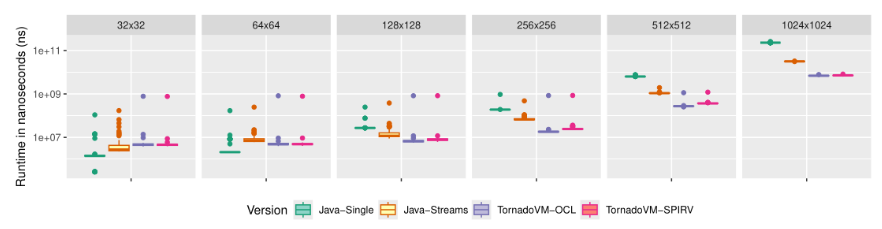
<p><img src="https://raw.githubusercontent.com/jjfumero/jjfumero.github.io/refs/heads/master/files/blog/25-02-07-babylon/plotBabylonVSTornadoVM-iGPU-streaming.png" alt="Alt text" /></p>

<p>As we can see, TornadoVM consistently outperforms Babylon, even with JIT compilation. 
TornadoVM’s performance is also more stable, with execution times clustered tightly around the average. 
Babylon’s performance on the same Intel integrated GPU varies more widely, though the total difference
 between its minimum and maximum execution times is only about 93 milliseconds.</p>

<p>Let’s see the big picture now. Let’s compare each of these approaches with Java and Java Vector API running with 
Java Streams (the fastest we can get with Java on CPUs). 
The following performance plot shows speedup against Java sequential run in peak performance (after warm up), 
and it compares against a) Java Parallel Vector API on CPU; b) TornadoVM with OpenCL C on the intel integrated 
GPU using a 2D kernel; c) TornadoVM with OpenCL C for 1D kernel; and d) Babylon/HAT.</p>

<p><img src="https://raw.githubusercontent.com/jjfumero/jjfumero.github.io/refs/heads/master/files/blog/25-02-07-babylon/speedupBabylonAndTornadoVM-igpu.png" alt="Alt text" /></p>

<p>We see that, for this application, MxM, running on the integrated GPU does not outperform the parallel Java 
Vector API implementation on CPU.<br />
Take away! Do not underestimate CPU power unless you have a powerful accelerator!</p>

<p>If we include the NVIDIA 4090 GPU, TornadoVM performs up to 2500x compared to Java for the OpenCL backend, 
as <a href="https://jjfumero.github.io/posts/2024/12/17/tornadovm-vs-opencl">I detailed in a recent technical article</a>!</p>

<h4 id="cuda-ptx-backend">CUDA PTX Backend</h4>

<p>And what about the PTX backend running on the NVIDIA 4090 GPU? 
The following performance graphs shows the run-time distribution (the lower, the better) of 
100 runs for Java sequential version, the parallel Java Vector API version, 
TornadoVM 1D with the PTX backend, the TornadoVM 2D version and Babylon.</p>

<p><img src="https://raw.githubusercontent.com/jjfumero/jjfumero.github.io/refs/heads/master/files/blog/25-02-07-babylon/plotPerformancePTX.png" alt="Alt text" /></p>

<p>The dots indicate the first execution, in which TornadoVM and Babylon perform the JIT compilation. As we can see, TornadoVM runs faster than Babylon, including the first run in which JIT compilation and  execution are involved (2.3x faster for TornadoVM 1D and 9.3x for the 2D version compared to Babylon).</p>

<p>When we compare Babylon and TornadoVM 1D with the parallel Java Vector API, we see that they run slower than the parallel CPU implementation.  When running on discrete GPUs, we must consider <a href="https://link.springer.com/chapter/10.1007/978-1-4842-9691-2_15">the cost of offloading</a>,  in which we need to consider the data transfers between the main CPU and the GPU, the number of concurrent/parallel operations we will perform on the device. 
For this particular application, MxM, we are under-utilizing the hardware when we run in 1D.</p>

<p>If you want to see an deeper analysis of the Java Vector API vs TornadoVM, I recommend the following article: 
<a href="https://jjfumero.github.io/posts/2024/12/17/tornadovm-vs-opencl">https://jjfumero.github.io/posts/2024/12/17/tornadovm-vs-opencl</a>.</p>

<p>By looking at the speeds for the PTX backend compared to Java:</p>

<p><img src="https://raw.githubusercontent.com/jjfumero/jjfumero.github.io/refs/heads/master/files/blog/25-02-07-babylon/speedupBabylonAndTornadoVM-ptx.png" alt="Alt text" /></p>

<p>As we see, TornadoVM achieves speedups of up to 1700x compared to Java, 11x faster than CPU execution, and 346x faster than Babylon/HAT for the same GPU.</p>

<p><em>Does this mean TornadoVM is always faster than Babylon/HAT?</em> No, it does not have to be. For some applications might be faster, other might be slower.
As I describe in the next Section more detail, TornadoVM has a JIT compiler and an optimizer, and that can give an advantage for some applications.</p>

<h2 id="hat-vs-tornadovm-differences-and-limitations">HAT vs TornadoVM: Differences and Limitations</h2>

<p>Let’s talk about current limitations for both Babylon and TornadoVM. 
Bear in mind that both projects are in active development, and, what I describe as limitations today (February 2025) might be solved/overcome in near future.</p>

<h3 id="current-limitations-of-babylonhat-vs-tornadovm">Current Limitations of Babylon/Hat vs TornadoVM</h3>

<p>Babylon and HAT are clearly focused on offering an interface to facilitate the manipulation and transformation of Java code. 
Thus, the main focus is compilation and the minimum runtime support to run the code 
(e.g., data handling and data representation).</p>

<p>TornadoVM, instead, offers a more complete solution to run on modern hardware accelerators, 
not just on GPUs. With that, TornadoVM comes a more complex engineering framework to solve adaptive compiler 
optimizations per architecture, a specialized code optimizer and an optimising runtime systems for different 
architectures and vendors. Let’s break this down:</p>

<h4 id="runtime-limitations">Runtime Limitations:</h4>
<p>Babylon HAT’s runtime features are currently limited.  Compared to TornadoVM, HAT lacks dynamic multiple device selection (e.g., multiple GPUs) and dynamic task-migration.
 Instead, devices are always statically assigned, reducing adaptability to changing system conditions. Furthermore, it doesn’t support copy operations for data ranges, restricting automatic data management capabilities, for example for automatic batch processing.</p>

<h4 id="hardware-support-and-code-generation">Hardware Support and Code Generation:</h4>
<p>Babylon HAT currently lacks code generation and a runtime orchestrator for 
other devices but  GPUs. Compared to TornadoVM, which supports GPUs from multiple vendors (Intel, NVIDIA, and AMD), CPUs, FPGAs, and even RISC-V accelerators, Babylon’s hardware support is considerably narrower. While future expansion is likely, the current limitations restrict its applicability. The absence of a code optimizer could impact performance potential on specialized hardware accelerators [4].</p>

<h4 id="compiler-optimizations">Compiler Optimizations:</h4>
<p>Babylon does not include an optimizer compiler, at least for now. 
In contrast, TornadoVM extends the state-of-the-art open source <a href="https://github.com/oracle/graal/tree/master/compiler">Graal JIT compiler</a> with new compiler 
optimization pipelines targeted for GPUs, FPGAs and multi-core CPUS, tuning loops ordering, automatic usage of fast intrinsics, automatic use of local/shared memory, etc.</p>

<h4 id="parallelism-and-api-complexity">Parallelism and API Complexity:</h4>
<p>Babylon HAT lacks native support for 2D and 3D parallelism (or 2D and 3D ranges). 
While this seems a relatively straightforward feature to implement in the future, its current absence restricts the efficient parallelization of multi-dimensional problems. 
The HAT API, with its Range programming model, requires developers to possess expertise in GPU programming models like CUDA, OpenCL, or oneAPI. While developers with this background can quickly become productive, those without it may face a steep learning curve.</p>

<p>This contrasts with TornadoVM’s dual API approach: a high-level annotation-based system for newcomers and a low-level Kernel API (similar to Babylon’s Range API) for expert developers. I think this dual approach can gather a broader range of developer expertise.</p>

<h3 id="current-limitations-in-tornadovm-vs-babylonhat">Current Limitations in TornadoVM vs Babylon/HAT</h3>

<p>TornadoVM is not perfect, by any means. It is also in continuous development and improving with every new version.</p>

<h4 id="support-for-custom-data-types">Support for Custom Data Types:</h4>
<p>The main limitation of TornadoVM is the lack of customization for user-data types 
compatible between Java and hardware accelerators. 
The <code class="language-plaintext highlighter-rouge">iFaceMapper</code> is a promising approach to program and handle efficient data structures compatible between hardware 
accelerators and the Java runtime.</p>

<h4 id="new-apis-and-data-types">New APIs and Data Types:</h4>
<p>This is also valid for Babylon/HAT, but since I am more involved in the TornadoVM project, 
I can refer to it here. Offering APIs and new types, although crucial to achieve performance, comes with the cost of developers having to 
learn new APIs. From my view, if these new interfaces are part of the JDK, then it will be easier to adopt these types of technologies.</p>

<h4 id="code-generation-of-structure-programming-languages">Code Generation of Structure Programming Languages:</h4>
<p>Code generation in TornadoVM is tricky, and for the OpenCL C backend, especially tricky. Going to low-level details, TornadoVM generates code from  the Low-Tier in Graal IR, an unstructured flow IR [5].  The challenge here is to generate a structured OpenCL C kernel from an unstructured flow graph.  Thus, it is sometimes difficult to generate correct code. A better target, and an easier target,  for TornadoVM is CUDA PTX, and SPIR-V, instead of OpenCL C. However, not all vendors (NVIDIA GPUs for example), allow to run SPIR-V for OpenCL. Since Babylon generates OpenCL C code from a close-to-an-AST form, it will be easier to generate correct OpenCL C code.</p>

<h4 id="maintenance-support">Maintenance Support:</h4>
<p>The fact that TornadoVM offers more backends and support for more devices also comes 
with the cost of maintenance. For a small team like TornadoVM, there is always the tradeoff between offering new features and keeping TornadoVM working for all possible devices, architectures and operating systems. This limitation, although not in the design, cannot be overlooked.</p>

<p>I would like this to be an active discussion. Do you know/do you see other limitations? Let me know in the comments.</p>

<h2 id="conclusions-and-final-thoughts">Conclusions and Final Thoughts</h2>

<p>Babylon, through its enhanced reflection API and the HAT subproject, offers a very interesting approach to GPU programming within Java. By enabling direct manipulation of code models at runtime, it facilitates the dynamic generation of GPU code.</p>

<p>This article is a brief introduction to Babylon and GPU programming via the HAT project, 
as well as an idea about current performance, similarities and differences compared to TornadoVM. All of these from the perspective of a person directly involved in GPU programming for Java for the past 12+ years (time flies!).</p>

<p>I like to see HAT happening as an incubator OpenJDK project in the future for the enhancement of the Java platform,  allowing Java developers not only to run on modern GPUs, but also on new upcoming accelerators  (e.g., new AI accelerators).  Babylon/HAT, in my opinion, is a step towards unification and consolidation of APIs and interfaces that help 
vendors and  implementers (like TornadoVM) to be as close as possible to Java while offering high performance.</p>

<p>On that front, I see HAT borrowing ideas and the research done in projects such as TornadoVM, Aparapi and others. For instance, as Gary Frost (main software architect of the HAT project and creator of Aparapi) <a href="https://www.youtube.com/watch?v=lbKBu3lTftc">acknowledged</a>, the HAT Accelerator and Compute-Context API were inspired by the TornadoVM API. Besides, I see ideas borrowed from the Aparapi project.</p>

<p>As I briefly mention, TorandoVM has served not only as an example, but also as a technology enabler, allowing HAT developers to write a SPIR-V backend using the Java framework we implemented to enable the SPIR-V backend in TornadoVM.</p>

<h2 id="discussions">Discussions</h2>

<p>If you are interested, let’s keep the discussions active:</p>

<p><a href="https://github.com/jjfumero/jjfumero.github.io/discussions/14">https://github.com/jjfumero/jjfumero.github.io/discussions/14</a></p>

<h2 id="links">Links</h2>

<p>[1] <a href="https://mail.openjdk.org/pipermail/discuss/2023-September/006226.html">https://mail.openjdk.org/pipermail/discuss/2023-September/006226.html</a></p>

<p>[2] <a href="https://openjdk.org/projects/babylon/articles/code-models">https://openjdk.org/projects/babylon/articles/code-models</a></p>

<p>[3] <a href="https://openjdk.org/projects/babylon/articles/linq">https://openjdk.org/projects/babylon/articles/linq</a></p>

<p>[4] <a href="https://jjfumero.github.io/posts/2024/12/17/tornadovm-vs-opencl">https://jjfumero.github.io/posts/2024/12/17/tornadovm-vs-opencl</a></p>

<p>[5] <a href="https://dl.acm.org/doi/pdf/10.1145/2816707.2816715">https://dl.acm.org/doi/pdf/10.1145/2816707.2816715</a></p>]]></content><author><name>Juan Fumero, PhD</name><email>juan@jfumero.dev</email></author><category term="Babylon" /><category term="GPUs" /><category term="HAT" /><category term="OpenJDK" /><category term="TornadoVM" /><category term="Performance" /><summary type="html"><![CDATA[Babylon and Programming for GPUs: introductions and comparisons with TornadoVM]]></summary></entry><entry><title type="html">Fixing libcurl conflicts in Fedora 41</title><link href="https://jfumero.dev/posts/2025/01/20/fedora-libcurl-issue" rel="alternate" type="text/html" title="Fixing libcurl conflicts in Fedora 41" /><published>2025-01-20T00:00:00+00:00</published><updated>2025-01-20T00:00:00+00:00</updated><id>https://jfumero.dev/posts/2025/01/20/fedora_libcurl-issue</id><content type="html" xml:base="https://jfumero.dev/posts/2025/01/20/fedora-libcurl-issue"><![CDATA[<p>Recently, I came across this error in Fedora 41, and I am not sure why the OS installed this library using different versions.</p>

<div class="language-bash highlighter-rouge"><div class="highlight"><pre class="highlight"><code><span class="nv">$ </span><span class="nb">sudo </span>dnf update
Updating and loading repositories:
Repositories loaded.
Problem: installed package libcurl-minimal-8.9.1-3.fc41.x86_64 conflicts with libcurl<span class="o">(</span>x86-64<span class="o">)</span> provided by libcurl-8.9.1-3.fc41.x86_64 from updates
  - libcurl-8.9.1-3.fc41.i686 from updates has inferior architecture
  - cannot <span class="nb">install </span>the best update candidate <span class="k">for </span>package libcurl-minimal-8.9.1-3.fc41.x86_64
  - cannot <span class="nb">install </span>the best update candidate <span class="k">for </span>package libcurl-8.9.1-2.fc41.i686

Package                                          Arch         Version                                           Repository                     Size
Skipping packages with conflicts:
 libcurl                                         x86_64       8.9.1-3.fc41                                      updates                   809.3 KiB

Nothing to <span class="k">do</span><span class="nb">.</span>
</code></pre></div></div>

<p>Fortunately, there is a solution to this. Based on this <a href="https://discussion.fedoraproject.org/t/how-to-dnf-automatic-in-fedora-41/142733/5">comment from the Fedora forums</a>, we can swap the library to use.</p>

<div class="language-bash highlighter-rouge"><div class="highlight"><pre class="highlight"><code><span class="nv">$ </span><span class="nb">sudo </span>dnf swap libcurl-minimal libcurl
Updating and loading repositories:
Repositories loaded.
Package <span class="s2">"libcurl-8.9.1-2.fc41.i686"</span> is already installed.

Package                                          Arch         Version                                           Repository                     Size
Removing:
 libcurl-minimal                                 x86_64       8.9.1-3.fc41                                      updates                   641.2 KiB
Downgrading:
 curl                                            x86_64       8.9.1-2.fc41                                      fedora                    796.2 KiB
   replacing curl                                x86_64       8.9.1-3.fc41                                      updates                   793.5 KiB
 libcurl-devel                                   x86_64       8.9.1-2.fc41                                      fedora                      1.3 MiB
   replacing libcurl-devel                       x86_64       8.9.1-3.fc41                                      updates                     1.3 MiB
Installing dependencies:
 libcurl                                         x86_64       8.9.1-2.fc41                                      fedora                    818.1 KiB

Transaction Summary:
 Installing:         1 package
 Replacing:          2 packages
 Removing:           1 package
 Downgrading:        2 packages

Total size of inbound packages is 2 MiB. Need to download 2 MiB.
After this operation, 180 KiB extra will be used <span class="o">(</span><span class="nb">install </span>3 MiB, remove 3 MiB<span class="o">)</span><span class="nb">.</span>
Is this ok <span class="o">[</span>y/N]: y
<span class="o">[</span>1/3] curl-0:8.9.1-2.fc41.x86_64                                                                           100% | 283.1 KiB/s | 315.1 KiB |  00m01s
<span class="o">[</span>2/3] libcurl-0:8.9.1-2.fc41.x86_64                                                                        100% | 239.2 KiB/s | 361.9 KiB |  00m02s
<span class="o">[</span>3/3] libcurl-devel-0:8.9.1-2.fc41.x86_64                                                                  100% | 547.2 KiB/s | 872.8 KiB |  00m02s
<span class="nt">---------------------------------------------------------------------------------------------------------------------------------------------------</span>
<span class="o">[</span>3/3] Total                                                                                                100% | 820.5 KiB/s |   1.5 MiB |  00m02s
Running transaction
<span class="o">[</span>1/8] Verify package files                                                                                 100% | 600.0   B/s |   3.0   B |  00m00s
<span class="o">[</span>2/8] Prepare transaction                                                                                  100% |  23.0   B/s |   6.0   B |  00m00s
<span class="o">[</span>3/8] Installing libcurl-0:8.9.1-2.fc41.x86_64                                                             100% |  57.1 MiB/s | 819.2 KiB |  00m00s
<span class="o">[</span>4/8] Downgrading libcurl-devel-0:8.9.1-2.fc41.x86_64                                                      100% |   7.1 MiB/s |   1.4 MiB |  00m00s
<span class="o">[</span>5/8] Downgrading curl-0:8.9.1-2.fc41.x86_64                                                               100% |  55.7 MiB/s | 798.6 KiB |  00m00s
<span class="o">[</span>6/8] Removing libcurl-devel-0:8.9.1-3.fc41.x86_64                                                         100% | 126.8 KiB/s | 649.0   B |  00m00s
<span class="o">[</span>7/8] Removing curl-0:8.9.1-3.fc41.x86_64                                                                  100% |   8.3 KiB/s |  17.0   B |  00m00s
<span class="o">[</span>8/8] Removing libcurl-minimal-0:8.9.1-3.fc41.x86_64                                                       100% |  22.0   B/s |   7.0   B |  00m00s
Complete!
</code></pre></div></div>

<p>And then, you can update the system as usual:</p>

<div class="language-bash highlighter-rouge"><div class="highlight"><pre class="highlight"><code><span class="nv">$ </span><span class="nb">sudo </span>dnf update
Updating and loading repositories:
Repositories loaded.
Package                                          Arch         Version                                           Repository                     Size
Upgrading:
 curl                                            x86_64       8.9.1-3.fc41                                      updates                   793.5 KiB
   replacing curl                                x86_64       8.9.1-2.fc41                                      fedora                    796.2 KiB
 libcurl                                         i686         8.9.1-3.fc41                                      updates                   836.9 KiB
   replacing libcurl                             i686         8.9.1-2.fc41                                      fedora                    846.1 KiB
 libcurl                                         x86_64       8.9.1-3.fc41                                      updates                   809.3 KiB
   replacing libcurl                             x86_64       8.9.1-2.fc41                                      fedora                    818.1 KiB
 libcurl-devel                                   x86_64       8.9.1-3.fc41                                      updates                     1.3 MiB
   replacing libcurl-devel                       x86_64       8.9.1-2.fc41                                      fedora                      1.3 MiB

Transaction Summary:
 Upgrading:          4 packages
 Replacing:          4 packages
</code></pre></div></div>]]></content><author><name>Juan Fumero, PhD</name><email>juan@jfumero.dev</email></author><category term="Fedora" /><category term="dnf" /><category term="issue" /><summary type="html"><![CDATA[Fixing libcurl conflicts in Fedora 41]]></summary></entry></feed>